
Jammed Material or Mat
Forcibly removing the material or mat may cause the machine to malfunction or the blade to break.
If the material or mat becomes jammed during an operation, follow the steps below to clear the jam:
Press
 (Start/Stop Button) to stop the operation.
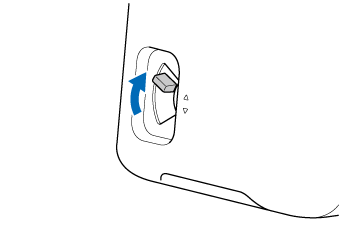
Set the mode change lever (on the left side of the machine) to the ▲ position.
Unlock both of the left and right shaft release levers.
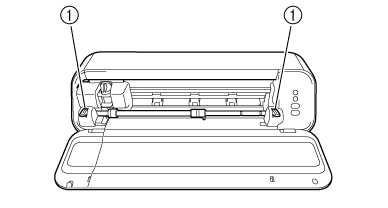
- Shaft Release Lever
Turn off the machine, unplug the power cord, and remove the holder.
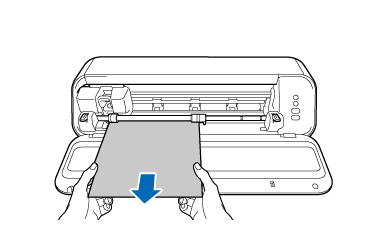
Slowly pull out the material or mat by hand.
Jams are caused by various reasons, including those listed below.
Check each to try to identify the problem, and when the jam is cleared, you can resume working on your project.
The material or mat has been fed askew. | |
Make sure that the feed roller is correctly positioned for the size of the material or mat. | |
Make sure that the roller lock button is in the locked position. | |
Make sure that the shaft release levers are set to the locked position. | |
If a mat is not used, make sure that the mode change lever is set to the ▼ position. | |
Make sure that the end of the mat is not curled. If it is curled, replace the mat with a new one. | |
Make sure that the leading edge of the material is not curled. If it is 12" (305 mm) width curled material, install the Feed Supporter, and then feed the material. For other size, use the mat to feed the material. | |
The mat’s adhesive strength has decreased, and the material does not stick to it. | |
If material cuttings, scraps, or dust remain attached to the mat, clean it. | |
Replace the mat with a new one. | |
The material extends from the adhesive area of the mat and not properly secured. | |
Re-attach the material so that it fits within the attaching area (grid) on the adhesive side of the mat. | |
Material cuttings, scraps, or dust remain around the feed slot. | |
Clean around the feed slot. | |
Material attaches to the feed rollers. | |
Material with a non-slip surface may attach to the feed rollers during feeding, causing the material to feed incorrectly. Use a mat for this material. | |
Material remains inside the machine and cannot fed (with Simple Matless Cutting) | |
If the material cannot be fed with Use material that is compatible with Simple Matless Cutting or use the cutting mat. | |
