
Cleaning
Cleaning the Holder
If material cuttings, scraps or dust accumulate in the holder, it may not operate correctly. Clean the holder after every use.
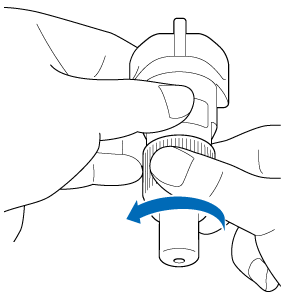
Twist the holder cap to the left to remove it.
Using a commercially available brush, clean off cuttings, scraps and dust.
Specifically, clean the surface of the blade and the cutting scraps or shavings in the spaces. If scraps and dust accumulate between the blade and holder, the blade may no longer rotate or the cutting quality may become poor. In addition, clean out any scraps and dust that has accumulated in the cap.
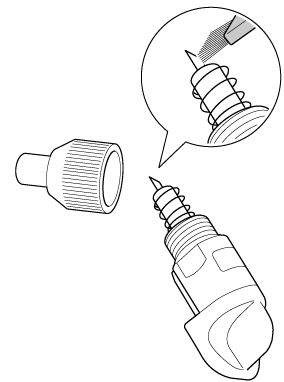 Clean so as to avoid bumping the blade edge against anything hard, such as metal.
 CAUTIONDo not touch the tip of the blade with your hands or fingers. There is a risk of injury.
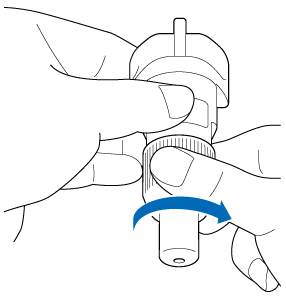
Twist the holder cap to the right to attach it to the holder.
Fully tighten the cap until it can no longer be turned.
Cleaning the Machine
Material cuttings, scraps, or dust remaining around the feed slot, carriage, or feed rollers may interfere with some functions, including loading and unloading of material or cutting mat. We recommend cleaning your machine periodically.
Turn off the machine.
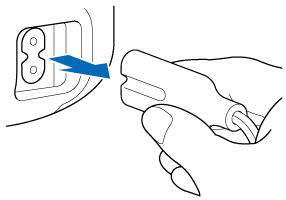
Unplug the power cord from the electrical outlet and from the back of the machine.
Open the front cover.
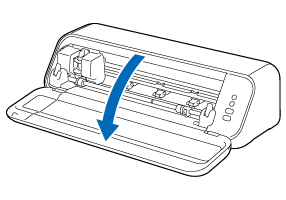
Remove the holder from the carriage.
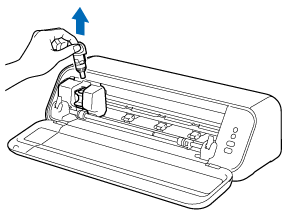
Use a commercially available brush to clean around the feed slot and the carriage.
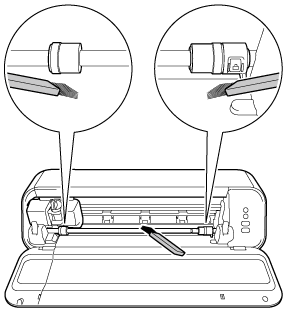
Unlock both of left and right shaft release levers, and then clean the feed rollers by wiping them with a soft, dry cloth.
If the feed rollers on the shaft (back) are also dirty, set the mode change lever to the ▲ position, and then wipe them with a dry soft cloth.
When cleaning, do not use a cloth moistened with water or alcohol. Using a liquid may damage the Feed Rollers.
Cleaning the Mat
Cuttings and cut edges of patterns attached to the mat may reduce the mat’s adhesive strength and prevent correct operation. Periodically clean the mat.
- Using the included spatula, lightly scrape off any cuttings attached to the mat. Strongly rubbing the adhesive side of the mat may damage it.
- Use tweezers (available either as optional accessories or commercially) to remove any scraps attached to the mat.
- Clean the dotted marks on the mat and their surrounding area with a dry cloth.
- Do not use alcohol or water to clean the mat.
- When the mat is not being used, clean it, and then store it with the protective sheet affixed. If the protective sheet is not affixed, the mat’s adhesive strength will decrease. At that time, do not affix the protective sheet while the mat is damp. Otherwise, the mat’s adhesive strength will decrease.
- Do not fold or bend the mat to store it.
- Store the mat at room temperature and in a location not exposed to high temperatures, high humidity or direct sunlight.