
Simple Matless Cutting
This machine can cut vinyl, paper, printed stickers, and more without using a cutting mat. In this manual, this feature is referred to as Simple Matless Cutting.
Simple Matless Cutting allows you to use either Half Cut or Perforation Cut. Certain types of designs in Artspira may combine both cut types. (Cut Types)
Material | Poster board, cardstock, vinyl, heat transfer vinyl, stickers/seals |
Thickness | 0.2 mm to 0.5 mm (150 to 250 g/m2) |
Material size | Standard A4/Letter or 12" (305 mm) wide When cutting any other sizes, use the cutting mat. |
Maximum cutting area | Approx. 11 3/16" (W) × 22 1/8" (L) (284.8 mm (W) × 561.6 mm (L)) |
When cutting rolled material that is 12" (305 mm) width, be sure to remove any curl and use the included Feed Supporter to feed the material.
- For more information on using Simple Matless Cutting with different type of material, visit our website “What can I cut?” (https://s.brother/csqka/).
Non-cuttable Areas
The measurements in the table below show maximum non-cuttable areas from the edges of the material sizes.
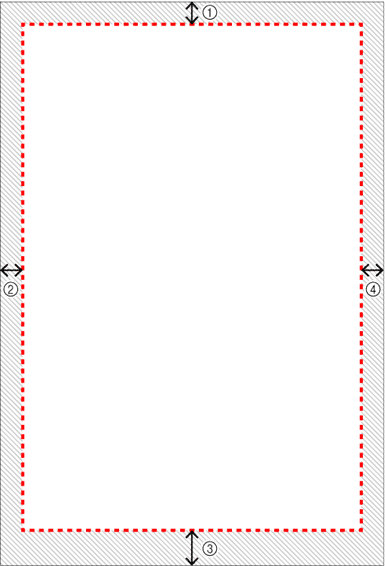
1 Top | 2 Left | 3 Bottom | 4 Right |
Approx. 0.7" (18 mm) | Approx. 0.5" (12 mm) | Approx. 1.2" (30 mm) | Approx. 0.3" (8 mm) |
Tips for Successful Perforation Cut
To make the most of this cutting process, follow these tips when using the Perforation Cut:
- Your pattern size should be at least approximately 2" (50 mm) or larger.
- When cutting multiple patterns at the same time, space them far apart.
- We recommend avoiding patterns with many sharp angles. When using a pattern with sharp angles, try to round them out, as shown below.

- If your material cannot be cut cleanly using Simple Matless Cutting, use a cutting mat.
- When cutting from the excess from an already-cut piece of material, use a cutting mat.
- Materials with a non-slip surface may stick to the feed rollers during feeding, causing the material to feed incorrectly. If the material does not feed correctly or become jammed, use a cutting mat.