
If Your Material Has a Curled Leading Edge
When cutting material that is 12" (305 mm) wide and its leading edge is curled, the material may feed askew or become jammed.
Follow the steps below to load your curled leading edge material using the included Feed Supporter.
Instructions for using the included Feed Supporter can also be viewed in this video:
Before installing the Feed Supporter, try to remove any curls from the material.
Adjust the position of the feed roller to
 .
.Adjusting the Feed Roller Position

- Feed Roller
After changing the position of the feed roller, be sure to set the shaft release lever to the locked position.Place the Feed Supporter between the left and right feed rollers.
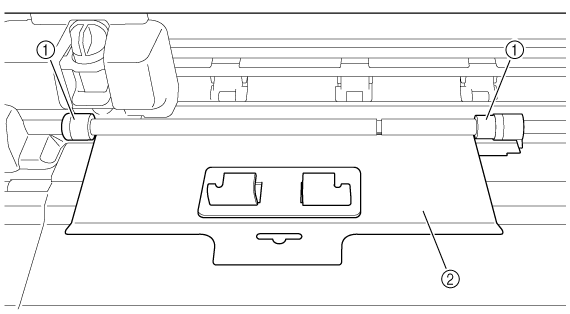
- Feed Roller
- Feed Supporter
Insert the Feed Supporter up to the back shaft. Fit the Feed Supporter hooks onto the front shaft.
Make sure that the front edge of the Feed Supporter fits under the feed rollers on the back shaft.
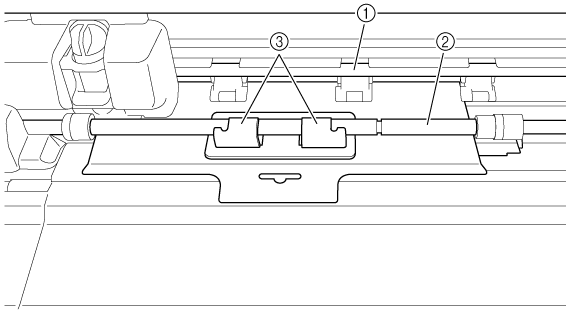
- Shaft (back)
- Shaft (front)
- Feed Supporter Hooks
Insert the material under the Feed Supporter, and then press
 (Feed Button) to feed the material.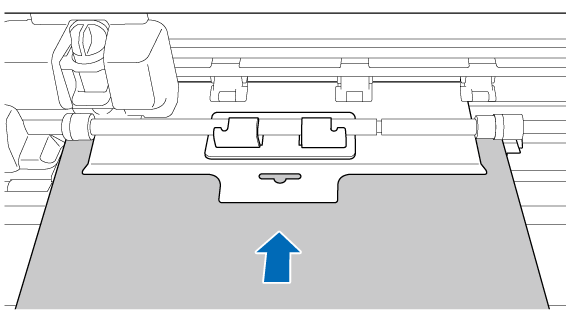
After the material feeds into the machine, but before cutting, pull the Feed Supporter toward you to remove it.
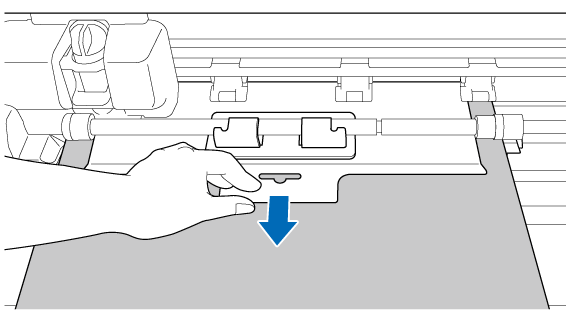 Before cutting, be sure to remove the Feed Supporter from the machine. Cutting with the Feed Supporter installed may result in not being cut properly.
Press
 (Start/Stop Button) to start cutting.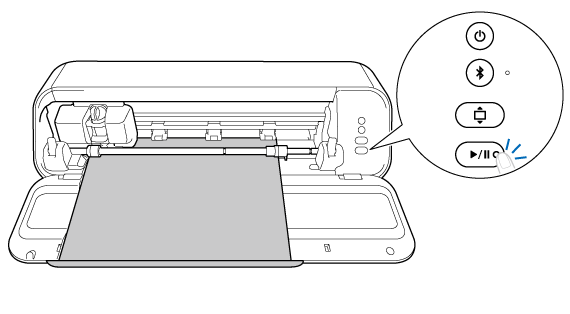
- If the material does not feed correctly, even when the Feed Supporter is used, try cutting using a cutting mat.
When using A4/Letter size material with a curled leading edge, try to remove the curl before feeding the material. If the material does not feed correctly, use a cutting mat.
When finished, press
(Feed Button) to eject the material.