
Machine Settings Screen
Depending on the Artspira version uploaded on your mobile device, the Machine Setting Screen menus listed in this manual may differ slightly from the ones you see in Artspira.
Connection status
Shows the status of the connection between the machine and app.

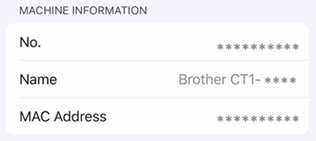
[MACHINE INFORMATION] (only when paired)
Shows information about the machine.
Machine software version information
Shows the machine's software version.
If there is an available update, make sure to update the machine to the latest version.

[MACHINE SETTINGS] (only when paired)
Shows the machine's settings.
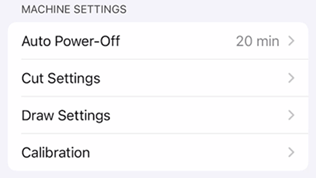
- [Auto Power-Off]: Specify the time until the machine automatically turns off.
- [Cut Settings]: Specify the cutting speed and pressure.
- [Draw Settings]: Specify the drawing speed and pressure.
- [Calibration]: Adjust the cutting position if it becomes misaligned while using the alignment cutting function. (Adjust the Cutting Position)
To change settings while data is being created, go to [Preview] screen and tap [Settings] , then tap [Machine Settings].[APP SETTINGS] (only when paired)
Shows the list of settings for the Artspira settings for this machine.

[Initial trial]: Set whether or not to show the guidance for the first trial cut.
[Reset to Default] (only when paired)
Reset the machine settings to the factory defaults.
All settings configured in [MACHINE SETTINGS] menu will be deleted from app and machine. Once the setting is reset, the machine will automatically shut down.

[Delete] (only when paired)
The connected machine’s information will be deleted from Artspira and disconnect the app from your machine.

[End-user license agreement]
View the terms of use for the machine firmware.
