Attaching the Embroidery Unit
 CAUTION
Do not move the machine with the embroidery unit attached. The embroidery unit could fall off and cause injury.
IMPORTANT
- Keep your hands and foreign objects away from the embroidery carriage and frame when the machine is embroidering. Damage or malfunction may result.
- Be sure to turn off the power before attaching or removing the embroidery unit. Otherwise, the machine may be damaged.
- Do not touch the inner connector of the embroidery unit. The pins on the embroidery unit connection may be damaged.
- Do not apply strong force to the embroidery unit carriage or pick up the unit by the carriage. Otherwise, the embroidery unit may be damaged.
- Do not push on the carriage when attaching the embroidery unit onto the machine. Moving the carriage may damage the embroidery unit.
- Make sure that there is enough space for the carriage of the embroidery unit to move. If the embroidery frame comes into contact with an object, the pattern may not be embroidered correctly, or damage may result.
- Do not touch the embroidery carriage until the initialization finishes.
- To avoid distorting your embroidery design, do not touch the embroidery carriage and frame when the machine is embroidering.
- Store the embroidery unit in a safe place to prevent damage to the unit.
Attaching the Embroidery Unit
Turn the main power to OFF, and then insert the embroidery unit connection into the connection port of the machine until it snaps into place.
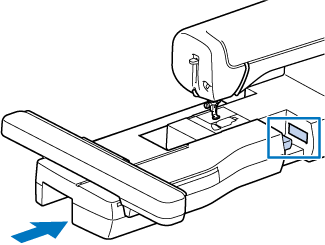
Be sure there is no gap between the embroidery unit and the machine. If there is a gap, the embroidery patterns will not embroider with the correct registration.
Turn the main power to ON.
- The following message will appear.
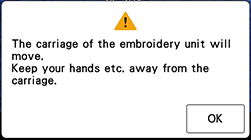
Touch [OK].
- The carriage will move to the initialization position.
Removing the Embroidery Unit
Remove the embroidery frame.
- For details on removing the embroidery frame, refer to “Removing the Embroidery Frame”.
Touch
 , then touch [OK].
Turn the main power to OFF.
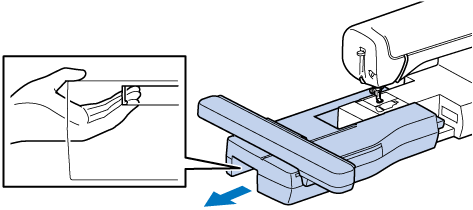
Pull the release lever, and pull the embroidery unit away from the machine.