

Some features are not available depending on the model.
 Download a printable version of this guide.
-
 Adobe Acrobat Reader is required to view this printable guide.
Click here to install.
Adobe Acrobat Reader is required to view this printable guide.
Click here to install.




Copy Options
DCP-T310/DCP-T510W/DCP-T710W
 (COPY) > Options.
 | Option | Description |
|---|---|
| Layout(2in1 ID) | Make N in 1, 2 in 1 ID, or Poster copies. |
|
4 in1 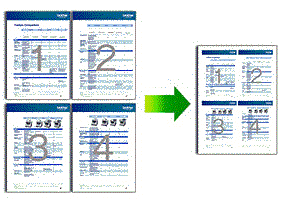 |
Poster 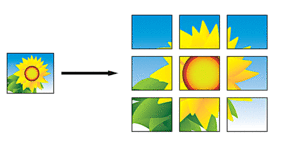 |
| Enlarge/Reduce | 100% | - |
| Enlarge | Select an enlargement ratio for the next copy. |
| Reduce | Select a reduction ratio for the next copy. |
| Fit to Page | Adjusts the copy size to fit on the paper size you have set. |
| Custom(25-400%) | Enter an enlargement or reduction ratio. |
| Density | Increase the density to make the text darker. Decrease the density to make the text lighter. |
| Quality | Select the Copy resolution for your type of document. |
| Stack/Sort | Select to stack or sort multiple copies. |
| Stack  | Sort  |
| Paper Type | Select a paper type. If copying on special paper, set the machine for the type of paper you are using to get the best print quality. |
| Paper Size | Select a paper size. If copying on paper other than A4 size, you must change the Paper Size setting. |
| Remove Bkg Clr | Removes the document's background colour in copies. The white background becomes more apparent. This saves some ink and may make certain copies easier to read. 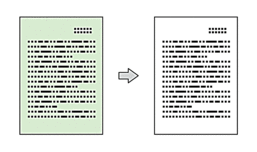 |
MFC-T910DW
(COPY). | Option | Description |
|---|---|
| Quality | Select the Copy resolution for your type of document. |
| Paper Type | Select a paper type. If copying on special paper, set the machine for the type of paper you are using to get the best print quality. |
| Paper Size | Select a paper size. If copying on paper other than A4 size, you must change the Paper Size setting. |
| Tray Select | Select the tray with the best paper type and size for your document. |
| Enlarge/Reduce | 100% | - |
| Enlarge | Select an enlargement ratio for the next copy. |
| Reduce | Select a reduction ratio for the next copy. |
| Fit to Page | Adjusts the copy size to fit on the paper size you have set. |
| Custom(25-400%) | Enter an enlargement or reduction ratio. |
| Density | Increase the density to make the text darker. Decrease the density to make the text lighter. |
| Stack/Sort | Select to stack or sort multiple copies. |
| Stack | Sort |
| Page Layout | Make N in 1, 2 in 1 ID, or Poster copies. |
|
4 in1 |
Poster 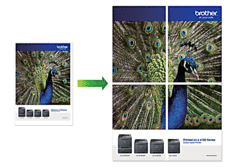 |
| 2-sided Copy | Select to copy on both sides of the paper. 1-sided→2-sided 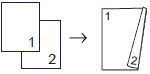 2-sided→2-sided 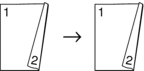 |
| Remove Background | Removes the document's background colour in copies. The white background becomes more apparent. This saves some ink and may make certain copies easier to read. |
| Set New Default | Saves the copy settings that you use most often by setting them as the default settings. |
| Factory Reset | Restores any changed copy settings to the factory settings. |