
Retrieving Stitch Patterns
Retrieve stitch patterns saved in the machine's memory or USB media.
When retrieving stitch patterns from a USB media, insert the USB media into the USB port on the machine.
Touch
 and select the desired destination.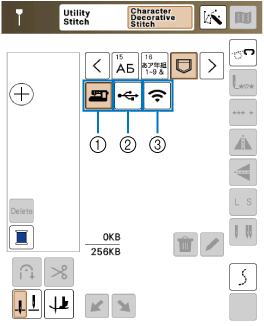
- Retrieve from the machine’s memory.
- Retrieve from a USB media. When retrieving stitch patterns from a USB media, insert the USB media into the USB port on the machine.
- Retrieve via the wireless network.
Stitch patterns which were uploaded via wireless network will be deleted from the machine when turning the machine off or entering the Power saving mode. Save stitch patterns to the machine memory if necessary.
- If the stitch pattern to be retrieved is in a folder of the USB media, touch the key for that folder. Touch
 to return to the previous screen.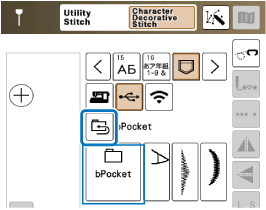
- Folders in the USB media cannot be created with the machine.
- Touch
 to retrieve stitch patterns via the wireless network. For detailed procedures, refer to PE-DESIGN manual (Version 11 or later).
 - For details on supported file extensions, refer to the following link.
Select the desired stitch pattern.
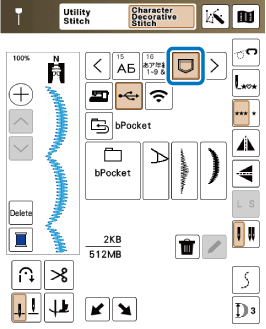
When you touch
 , the selected stitch pattern will be deleted permanently.