Connecting the P-touch to Your Android™ Device

Use Wireless Direct to connect the P-touch to your Android™ device. The P-touch serves also as a wireless network access point.

When Your Android™ Device Supports NFC (Near Field Communication)

1
If the Wi-Fi lamp is not lit, press and hold the Wireless Mode button for one second to turn on the wireless LAN function.
After the Wi-Fi lamp is lit, release the button. The Wi-Fi lamp flashes.
2
3
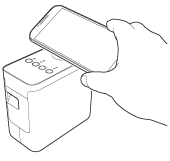
Activate the NFC function of your Android™ device, and touch it to the NFC mark on the P-touch.
Graphic
Note Note
If a dedicated application is not installed on your device, the Google Play homepage will be displayed on the device.
If this occurs, install a dedicated application, and then continue the procedure from step 3. See Available Applications for Use with Android™ Devices.
4
When your Android™ device is detected, the NFC lamp on the P-touch goes off for a moment and then is lit again.