

Home > Set Up Your Printer > Charge the Rechargeable Li-ion Battery


Charge the Rechargeable Li-ion Battery
Tips on Using the Rechargeable Li-ion Battery
Fully charge the rechargeable Li-ion battery before using the printer.  Rechargeable Li-ion Battery Characteristics
- High-density (dark) printing discharges the rechargeable Li-ion battery faster than low-density printing. Adjust the print density setting in the Device Settings. For more information, see Related Topics.
- The rechargeable Li-ion battery charging must take place in an environment with a temperature between 32°F and 104°F (0°C and 40°C), otherwise the rechargeable Li-ion battery will not be charged. If the charging stops because the environment temperature is too low or too high, place the printer in an environment with a temperature between 32°F and 104°F (0°C and 40°C) and try charging again.
- The recommended charging temperature range for the rechargeable Li-ion battery is from 41°F to 95°F (5°C to 35°C).
- If you use the printer when both the rechargeable Li-ion battery is installed and the AC Adapter or Car Adapter is connected, charging may stop even if the rechargeable Li-ion battery is not fully charged.
To ensure the highest performance and longest life from the rechargeable Li-ion battery:
- Do not use or store the rechargeable Li-ion battery in a location exposed to extreme high or low temperatures as it may deteriorate more quickly.
- Remove the rechargeable Li-ion battery when storing the printer for long periods of time.
- Store rechargeable Li-ion batteries with less than a 50% charge in a cool dry place and out of direct sunlight.
- Recharge the rechargeable Li-ion battery every six months if it is stored for long periods of time.
- It is normal and safe for the printer to become warm while charging. Disconnect the charger and stop using the printer if it becomes hot to the touch.
- When the printer is turned on, the rechargeable Li-ion battery health status appears on the LCD.
For the battery health level indication, see Related Topics.
Charge the Rechargeable Li-ion Battery Using a USB Cable
- The USB Type-C cable is not included.
- Compatible USB cable: USB Type-C to USB Type-C (5 V, 1.5 A or more)
- Compatible USB charger: USB Type-C (5 V, 1.5 A or more)
- Make sure that the rechargeable Li-ion battery is installed in the printer.
- Open the USB Port Cover.
- Connect the USB cable to the USB port on the printer, and then either to your computer or to a compatible USB charger.
Charge the Rechargeable Li-ion Battery Using an AC Adapter (Optional)
When purchasing the printer, purchase the correct AC Adapter and AC power cord for the region where the printer will be used.
The AC Adapter and AC power cord are optional accessories.
- Make sure that the rechargeable Li-ion battery is installed in the printer.
- Open the DC Connector Cover and connect the AC Adapter (PA-AD-600A) to the printer.
- Connect the AC power cord to the AC Adapter.
- Connect the AC power cord to a nearby AC power outlet (100 V AC - 240 V AC, 50/60 Hz).
RJ-3235B/RJ-3255WB
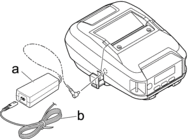
- AC Adapter
- AC power cord
RJ-4235B/RJ-4255WB
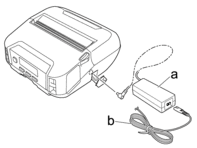
- AC Adapter
- AC power cord
Charge the Rechargeable Li-ion Battery Using a Car Adapter (Optional)
Connect the printer to your vehicle’s 12 V DC power outlet (cigarette lighter or similar) to charge the rechargeable Li-ion battery.
The Car Adapter is an optional accessory.
- Make sure that the rechargeable Li-ion battery is installed in the printer.
- RJ-3235B/RJ-3255WB: Connect the Car Adapter (PA-CD-600CG) to the vehicle’s 12 V DC power outlet.
- RJ-4235B/RJ-4255WB: Connect the Car Adapter (PA-CD-600CG, PA-CD-600WR) to the vehicle’s 12 V DC power outlet.
- Open the DC Connector Cover and connect the Car Adapter to the printer.
RJ-3235B/RJ-3255WB
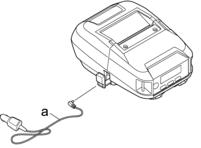
- Car Adapter
RJ-4235B/RJ-4255WB
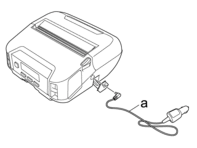
- Car Adapter
Charge the Rechargeable Li-ion Battery Using the Battery Charger (Optional) or the Active Docking Station (Optional)
The rechargeable Li-ion battery can be charged using the Battery Charger (Optional) or the Active Docking Station (Optional). For more information, see Related Topics.
When not Using the Rechargeable Li-ion Battery (RJ-4235B/RJ-4255WB)
The printer may be operated without the rechargeable Li-ion battery in the following ways:
- When an AC Adapter (PA-AD-600A) or Car Adapter (PA-CD-600CG) is connected to the printer.
- When the printer is installed in the Single Active Docking Station (PA-CR-002A).
When the rechargeable Li-ion battery is not installed, securely fasten the rechargeable Li-ion battery cover with self-tapping screws (M2.6 x 0.24" (6 mm)) (not included).
Stop Charging the Rechargeable Li-ion Battery
To stop the rechargeable Li-ion battery charging, disconnect the printer from the computer or power source.
Did you find the information you needed?