

Home > Set Up Your Printer > LCD Overview


LCD Overview
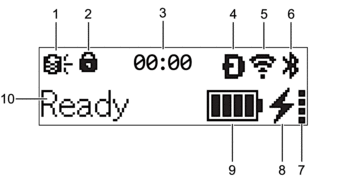
- Update (RJ-3235B/RJ-3255WB/RJ-4255WB)
Indicates the FTP connectivity and update status.
 There is new data.(flashing)
 Data update is unsuccessful.(flashing)
 Cannot connect to the server.
Remote Update(RJ-3235B/RJ-3255WB/RJ-4255WB)
The Remote Update feature allows semi-automatic updating of printer settings by connecting to a network folder that contains the necessary update files.
Prepare for a remote update:
Open the BRConfiguration Tool on your computer and configure the settings in the Communication settings menu.
Perform a remote update from your printer:
Press the Menu /
 (Select) button to select the [Update] menu, and then press the
  (Feed) / OK button.
 Select [Start], and then press the
(Feed) / OK button again. During the update, the LCD will display the message [Receiving] or [Downloading].
For more information on how to update data, visit the Brother support website at support.brother.com.
- Menu Key Lock
Displays when the Menu Key Function in BRConfiguration Tool is set to Disable.
- Clock
Displays when [Clock] is set to [On].
- Wireless Direct (RJ-3255WB/RJ-4255WB)
Indicates if Wireless Direct is available.
- WLAN (RJ-3255WB/RJ-4255WB)
 Your printer is connected to the wireless network.
 Your printer is searching for a wireless network.
 - Bluetooth®/MD
Indicates if Bluetooth is on. When the icon is flashing, the printer is automatically re-pairing. For more information, see Related Topics.
- Battery health level
The Battery health level icon does not appear when charging is not possible.
MessageIconConditionBatteryHealth Excellent No problems. The rechargeable Li-ion battery may be used.BatteryHealth Good
 Still healthy. The rechargeable Li-ion battery can be used.Battery Poor Replace soon
 The rechargeable Li-ion battery health is deteriorating.Batt.VeryPoor Replace battery
 The rechargeable Li-ion battery is badly deteriorated.
 - Charge status
Displays the charge status of the rechargeable Li-ion battery.
 Charging
 Not Charging (The rechargeable Li-ion battery cannot be charged if its temperature is above 104°F (40°C) or below 32°F (0°C).)No iconCharging is finished or paused
 - Battery level
Indicates the remaining battery level.
 Full
Full High
High Half
Half Low
Low - Printer status
Displays the printer status.