

Home > Routine Maintenance > Replace Supplies > Replace the Paper Feeding Kit for the Multi-purpose (MP) Tray


Replace the Paper Feeding Kit for the Multi-purpose (MP) Tray
Before starting the replacement procedure, see Related Information: Replace Supplies.
Replace the Paper Feeding Kit for the Multi-purpose (MP) Tray
- Press and hold
 to turn the machine off.
 - Unplug the power cord from the electrical socket.
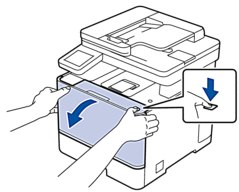
- Press the front cover release button and open the front cover.
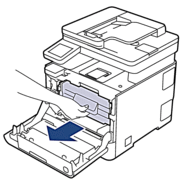
- Hold the drum unit's green labeled handle. Pull the drum unit out of the machine until it stops.
- IMPORTANT
- We recommend placing the toner cartridge and drum unit assembly on a clean, flat surface with disposable paper underneath it in case you accidentally spill or scatter toner.
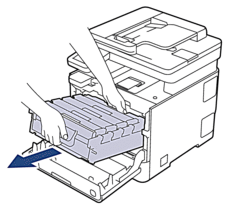
- Holding the green labeled handles of the drum unit, lift the front of the drum unit and remove it from the machine.
- IMPORTANT
-
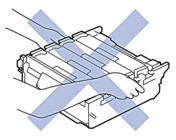
Hold the handles of the drum unit when you carry it. DO NOT hold the sides of the drum unit.
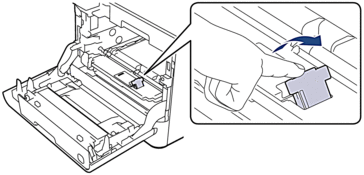
- Raise the MP roller holder stopper.
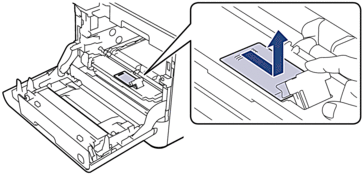
- Slide the MP roller holder to the right, and then remove it.
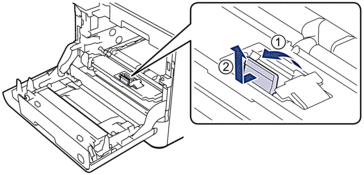
- Raise the MP separation pad, and then pull it straight up and out of the machine.
- Unpack the new paper feeding kit for the MP tray.
- Insert the new MP separation pad with the grey pad facing you.
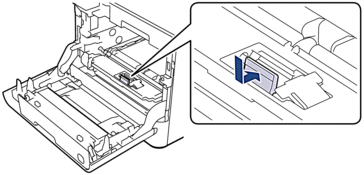
- Press the MP separation pad forward until you hear a click.
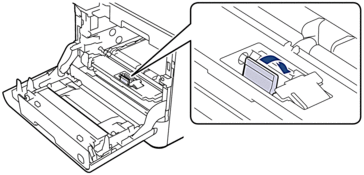
- Insert the MP roller holder, and then slide it to the left.
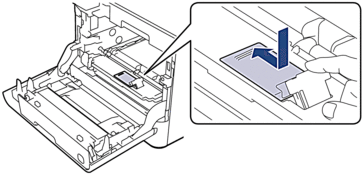
- Press down to close the MP roller holder stopper.
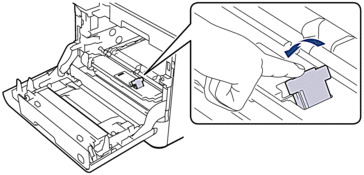
- Gently slide the drum unit into the machine until it stops.
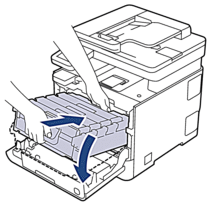
- Using the green labeled handle, push the drum unit back into the machine until it locks in place.
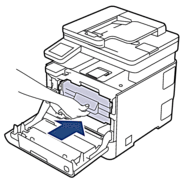
- Close the machine's front cover.
- Plug in the power cord and press to turn the machine on.
Reset the Paper Feeding Kit for the Multi-purpose (MP) Tray Counter
- Make sure the machine is turned on.
- Press and hold
 (Toner) for about five seconds.
 - Press [PF Kit MP].
- Press [Yes].
Did you find the information you needed?