

Home > Introduction to Your Machine > Control Panel Overview


Control Panel Overview
DCP-L8630CDW/MFC-L8730CDW
The control panel may vary depending on your model.
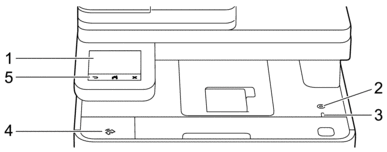
- Touchscreen Liquid Crystal Display (LCD)
- Access menus and options by pressing them on the touchscreen.
 Power On/Off
 -
- Turn the machine on by pressing.
- Turn the machine off by holding down. The LCD displays [Shutting Down] for a few seconds before the machine turns off. If you have an external telephone or TAD connected, it is still available.
- LED Power Indicator
-
The LED lights up depending on the machine’s power status.
- Near Field Communication (NFC) Reader (MFC-L8730CDW)
- Use card authentication, if applicable, by touching your Integrated Circuit Card (IC Card) to the NFC symbol on the machine.
- Touchpanel
-
 (Back)
 - Press to go back to the previous menu.
 (Home)
 - Press to return to the Main Home screen.
 (Cancel)
 - Press to cancel an operation.
MFC-L8930CDW/MFC-L8970CDW
The control panel may vary depending on your model.
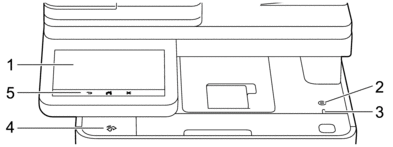
- Touchscreen Liquid Crystal Display (LCD)
- Access menus and options by pressing them on the touchscreen.
- Power On/Off
-
- Turn the machine on by pressing.
- Turn the machine off by holding down. The LCD displays [Shutting Down] for a few seconds before the machine turns off. If you have an external telephone or TAD connected, it is still available.
- LED Power Indicator
-
The LED lights up depending on the machine’s power status.
- Near Field Communication (NFC) Reader (MFC-L8930CDW/MFC-L8970CDW)
- Use card authentication, if applicable, by touching your Integrated Circuit Card (IC Card) to the NFC symbol on the machine.
- Touchpanel
-
- (Back)
- Press to go back to the previous menu.
- (Home)
- Press to return to the Main Home screen.
- (Cancel)
- Press to cancel an operation.
Did you find the information you needed?