

Home > Paper Handling > Load Documents > Load Documents in the Automatic Document Feeder (ADF)


Load Documents in the Automatic Document Feeder (ADF)
The ADF can hold multiple pages and feeds each sheet individually.
- DO NOT pull on the document while it is feeding.
- DO NOT use paper that is curled, wrinkled, folded, ripped, stapled, paper clipped, glued, or taped.
- DO NOT use cardboard, newspaper, or fabric.
- Make sure paper with correction fluid or ink is completely dry before use.
Use paper that is within the sizes and weights shown in the table. Always fan the pages before placing them in the ADF.
Document Sizes and Weights
| Length *1: |
|
| Width: | 4.1 to 8.5 in. (105 to 215.9 mm) |
| Paper Weight: | 17 to 28 lb (64 to 105 g/m²) |
*1
Up to 35.4 in. (900 mm) when using the long paper function.
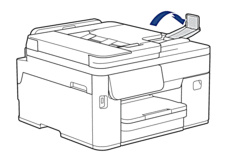
- Unfold the ADF document output support flap.
- IMPORTANT
- To avoid damaging paper, when loading long paper in the ADF, DO NOT unfold the ADF document output support flap.
- Fan the pages well.
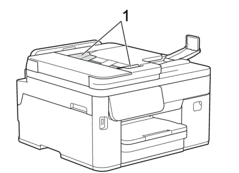
- Adjust the paper guides (1) to fit the document size.
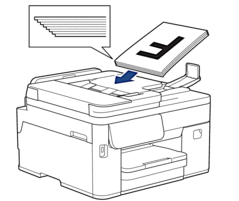
- Place your document face up and top edge first in the ADF, as shown in the illustration, until you feel the document touch the feed rollers.

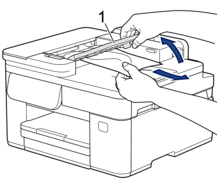
If you loaded a small size document and cannot remove it, lift the ADF document support (1), and then remove the document.
- IMPORTANT
- DO NOT leave any documents on the scanner glass. If you do this, the ADF may jam.
Did you find the information you needed?