

Home > Introduction to Your Brother Machine > Control Panel Overview


Control Panel Overview
ADS-3100/ADS-4100
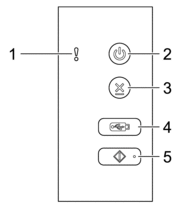
- Error Indicator (with LED)
- Blinks when the machine detects an error.
 (Power On/Off) (with LED)
 - Press to turn the machine on.
- Press and hold to turn the machine off.
 (Stop)
 - Press to stop or cancel your current action and return to Ready Mode.
 (Scan to USB)
 - Press to scan to a USB flash drive.
 (Scan to PC)
 - Press to scan to the computer.
 Install a scanning application (for example, Brother iPrint&Scan) and configure the settings within the application before scanning from the machine.
ADS-3300W/ADS-3350W/ADS-4500W/ADS-4550W
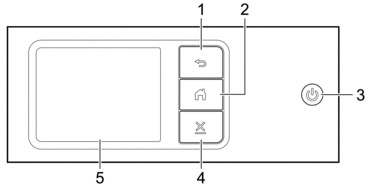
 (Back)
 - Press to go back to the previous screen or menu.
 (Home Button)
 - Press to return to the Home Screen and Ready Mode.
- (Power On/Off) (with LED)
- Press to turn the machine on.
- Press and hold to turn the machine off. The LCD displays [Shutting Down] and stays on for a few seconds before turning off.
 (Stop)
 - Press to stop or cancel your current action and return to Ready Mode.
- Touchscreen LCD
- Access the menus and options by pressing the touchscreen.
Did you find the information you needed?