Multiple pages have fed at the same time. Follow the steps below to clear a multifeed.
| 1 | Remove any paper from the document feeder. |
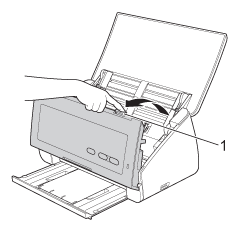
| 2 | Open the Front Cover by pinching the Cover Release Lever (1). |
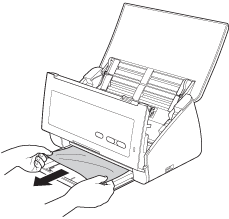
| 3 | Pull the document out of the machine. |
| 4 | Close the Front Cover. |
| 5 | Press any key. |
| 6 | Confirm that the data scanned before the multifeed occurred has been saved, and then start scanning again from the next page or from the beginning. |

Note
| | The data scanned before the multifeed occurred is not saved when scanning using the Scan to USB key on the control panel unless the file type is JPEG. |


CAUTION
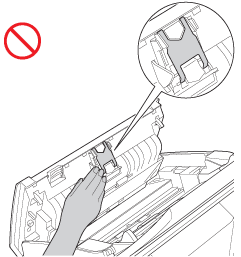
| | DO NOT touch the metal part of the Separation Pad Cover. Doing this may cause injury to you and serious damage to the machine. |

Important
| | Remove any paper from the document feeder before closing the Front Cover. |