Documents can jam in the document feeder unit if they are not inserted or fed properly, or if they are too long. Follow the steps below to clear a document jam.
| 1 | Take out any paper from the ADF that is not jammed. |
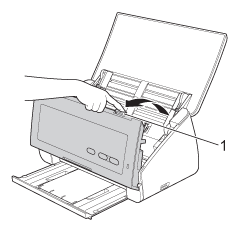
| 2 | Open the Front Cover by pinching the Cover Release Lever (1). |
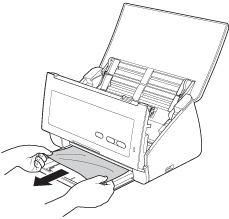
| 3 | Pull the jammed document out of the machine.  Note | | Check for ripped paper inside the machine. Remove any ripped paper you find inside the machine. |
|
| 4 | Close the Front Cover. |
| 5 | Press any key. |


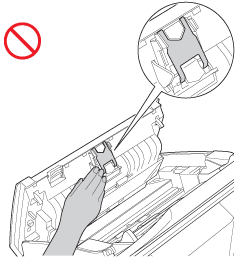
CAUTION
| | DO NOT touch the metal part of the Separation Pad Cover. Doing this may cause injury to you and serious damage to the machine. |

Important
| • | To avoid damage to the jammed document, DO NOT pull the document out before opening the Front Cover. |
| • | Take out any paper from the ADF before closing the Front Cover. |
| • | To avoid future document jams, do the following: | • | Close the Front Cover properly by pushing it gently in the middle. | | • | Configure the settings for your document properly. | | • | | | • | Stagger the pages and then load your document. | | • | |
|