| | |
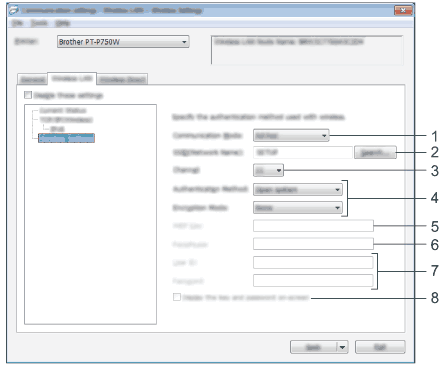
| 1. | Communication Mode Select [Ad-hoc] or [Infrastructure].
 Note Note |
| 2. | SSID (Network Name) Click the [Search] button to display the SSID selections in a separate dialog box. |
| 3. | Channel Select from the displayed options. |
| 4. | Authentication Method/Encryption Mode The supported encryption modes for the various authentication methods are as shown in Communication Modes and Authentication Methods/Encryption Modes. |
| 5. | WEP Key You can only specify a setting when WEP is selected as the encryption mode. |
| 6. | Passphrase You can only specify a setting when WPA2-PSK, or WPA/WPA2-PSK is selected as the authentication method. |
| 7. | User ID/Password You can only specify settings when LEAP, EAP-FAST, EAP-TTLS or EAP-TLS is selected as the authentication method. In addition, with EAP-TLS, it is not necessary to register a password, but a client certificate must be registered. To register a certificate, connect to the printer from a web browser, and then specify the certificate. For details on using a web browser, see Web Based Management. |
| 8. | Display the key and password on-screen If this check box is selected, keys and passwords will be displayed in plain text (non-encrypted text). |
| • | When [Communication Mode] is set to [Ad-hoc] | ||
| • | When [Communication Mode] is set to [Infrastructure]  Important Important
|
| | |