

Home > Introduction to Your Machine > Control Panel Overview


Control Panel Overview
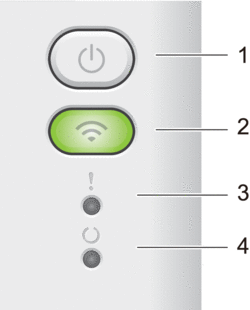
 Power On/Off
 -
Turn the machine on by pressing
. Turn the machine off by pressing and holding
. All the LEDs turn off when you enable the Power Off mode. - Press to clear certain errors.
- Press to print any data remaining in the machine's memory.
- Press and hold for about two seconds to cancel a print job.
- Wi-Fi
-
Press and hold the Wi-Fi button and launch the wireless installer on your computer. Follow the on-screen instructions to set up a wireless connection between your machine and your network.
When the Wi-Fi light is on, your Brother machine is connected to a wireless access point. When the Wi-Fi light blinks, the wireless connection is down, or your machine is in the process of connecting to a wireless access point.
- Error LED (
 )
) - The Error LED ( ) indicates that the machine is in error state. Also, the Error LED ( ) indicates the kind of error in combination with other LEDs.
- Error LED (
- Ready LED (
 )
) - The Ready LED ( ) will blink depending on the machine status.
- Ready LED (
Did you find the information you needed?