


| | |
| 1 | Press Search/Speed Dial. |
| 2 | Press  . . |
| 3 | Press the dial pad key for the first letter of the name. (Use the chart on Entering text to help you enter letters.) Press OK. |
| 4 | Press  or to scroll until you find the name you are looking for. or to scroll until you find the name you are looking for.Press OK. |
| 5 | Press Black Start or Color Start. |
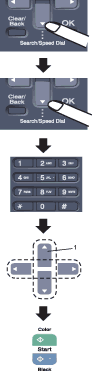
| 1. | To search alphabetically, you can use the dial pad to enter the first letter of the name you are looking for. |
 Note
Note| • | If you do not enter a letter and press OK in 3, all registered names will appear. Press or to scroll until you find the name you are looking for. |
| • | If the LCD shows No Contact Found when you enter the first letter of the name, it means that a name for the letter is not stored. |
| | |