Note
| | In Canada the photo bypass tray is called the photo paper tray. |
Use the photo bypass tray, which has been assembled on the top of the output paper tray cover, to print on photo 4" × 6" and photo L 3.5" × 5" size paper. When you use the photo bypass tray, you do not have to take out the paper that is in the tray beneath it.
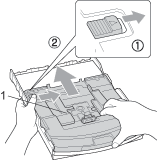
| 1 | Press the photo bypass tray release button with your left thumb and push the photo bypass tray backward until it clicks into the photo printing position. |
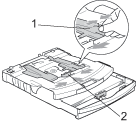
| 2 | Press and slide the paper side guides (1) and paper length guide (2) to fit the paper size. |
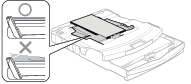
| 3 | Put the photo paper into the photo bypass tray and gently adjust the paper side guides to the paper. Make sure the paper side guides touch the sides of the paper. Note | • | Be careful that you do not push the paper in too far; it may lift at the back of the tray and cause feed problems. | | • | Always make sure that the paper is not curled. |
|
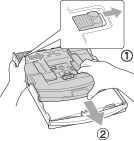
| 4 | When you have finished printing photos return the photo bypass tray to the normal printing position. Press the photo bypass tray release button with your left thumb and pull the photo bypass tray forward until it clicks. |