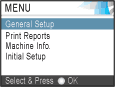
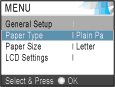
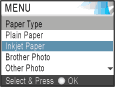
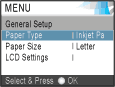
The following steps show how to change a setting in the machine. In this example the Paper Type setting is changed from Plain Paper to Inkjet Paper.
| 1 | Press Menu. |
| 2 | Press  or  to choose General Setup. Press OK. |
| 3 | Press or to choose Paper Type. Press OK. |
| 4 | Press or to choose Inkjet Paper. Press OK. You can see the current setting on the LCD: |
| 5 | Press Stop/Exit. |