



Copy an ID Card
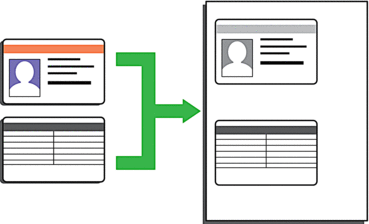
- You may copy an identification card only to the extent permitted under applicable laws. For more detailed information, see the Product Safety Guide.
DCP-L2510D/DCP-L2530DW/DCP-L2537DW/DCP-L2550DN/MFC-L2710DN/MFC-L2710DW
- (For MFC models)Press
 (COPY).
 - Place an identification card face down near the upper left corner of the scanner glass.
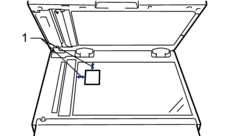
1 4.0 mm or greater (top, left)
- Press 2 in 1 (ID) Copy.
- Do one of the following:
For MFC models
Use the dial pad to enter the number of copies you want.
For DCP models
Press
 or
or  to enter the number of copies you want.
- Press Start.The machine scans one side of the identification card.
- After the machine has scanned the first side, turn over the identification card.

- Press Start to scan the other side.
MFC-L2730DW/MFC-L2750DW
- Place your identification card face down near the upper left corner of the scanner glass.
1 4.0 mm or greater (top, left)
- Press
 .
. - Enter the number of copies.
- Press [Start].The machine scans one side of the identification card.
- After the machine has scanned the first side, turn over the identification card and press [Continue] to scan the other side.
Did you find the information you needed?