

Home > Introduction to Your Machine > Control Panel Overview


Control Panel Overview
MFC-J6560DW
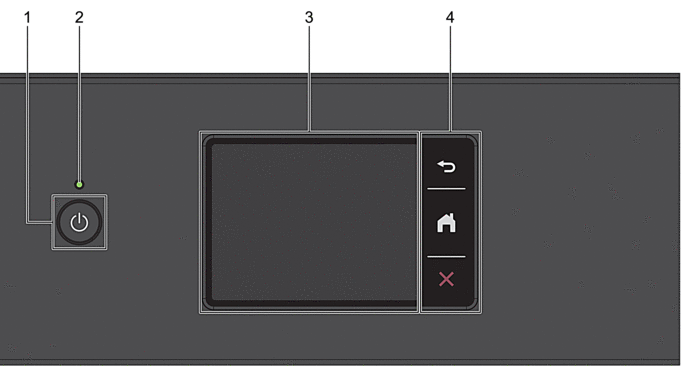
 Power On/Off
 - Press to turn on the machine.
- Press and hold to turn off the machine. The touchscreen displays [Shutting Down] and stays on for a few seconds before turning itself off. A connected external telephone or Telephone Answering Device (TAD) will always remain available.
- If you turn off the machine using , it will still clean the print head periodically to maintain print quality. To prolong print head life, provide better ink efficiency, and maintain print quality, keep your machine connected to a power source at all times.
- LED Power Indicator
- The LED lights up depending on the machine’s power status.
When the machine is in Sleep Mode, the LED flashes.
- Touchscreen Liquid Crystal Display (LCD)
- Access menus and options by pressing them on the touchscreen.
- Menu Buttons
-
 (Back)
 - Press to go back to the previous menu.
 (Home)
 - Press to return to the Home screen.
 (Cancel)
 - Press to cancel an operation.
MFC-J6960DW/MFC-J6975DW
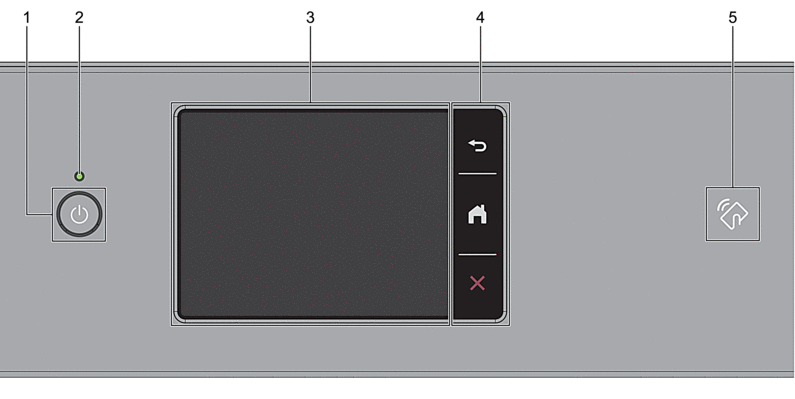
- Power On/Off
- Press to turn on the machine.
- Press and hold to turn off the machine. The touchscreen displays [Shutting Down] and stays on for a few seconds before turning itself off. A connected external telephone or Telephone Answering Device (TAD) will always remain available.
- If you turn off the machine using , it will still clean the print head periodically to maintain print quality. To prolong print head life, provide better ink efficiency, and maintain print quality, keep your machine connected to a power source at all times.
- LED Power Indicator
- The LED lights up depending on the machine’s power status.
When the machine is in Sleep Mode, the LED flashes.
- Touchscreen Liquid Crystal Display (LCD)
- Access menus and options by pressing them on the touchscreen.
- Menu Buttons
-
- (Back)
- Press to go back to the previous menu.
- (Home)
- Press to return to the Home screen.
- (Cancel)
- Press to cancel an operation.
 NFC (Near Field Communication) symbol
 -
(MFC-J6975DW)
You can use card authentication by touching the IC card to the NFC symbol on the control panel.
Did you find the information you needed?