

Home > Paper Handling > Load Paper > Unprintable Area


Unprintable Area
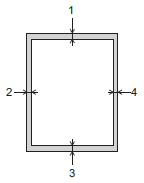
The unprintable area depends on the settings in the application you are using. The figures below show the unprintable areas on Cut-sheet paper and envelopes. The machine can print in the shaded areas of Cut-sheet paper only when the Borderless print feature is available and turned on.
Cut-Sheet Paper
Envelope
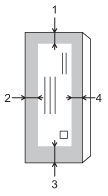
| Top (1) | Left (2) | Bottom (3) | Right (4) |
|---|
| Cut-Sheet | 0.12 in. (3 mm) | 0.12 in. (3 mm) | 0.12 in. (3 mm) *1 | 0.12 in. (3 mm) |
| Envelope | 0.47 in. (12 mm) | 0.12 in. (3 mm) | 0.47 in. (12 mm) | 0.12 in. (3 mm) |

The Borderless print feature is not available for envelopes, 2-sided printing and some paper sizes, such as Legal and Executive.
*1
(MFC-J6960DW/MFC-J6975DW) 0.20 in. (5 mm) when using Long paper.
Did you find the information you needed?