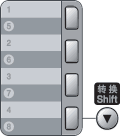
Your machine has 4 One Touch keys where you can store 8 fax or telephone numbers for automatic dialling. To access numbers 5 to 8, hold down Shift as you press the One Touch key.
| 1 | Press Menu, 2, 3, 1. |
| 2 | Press the One Touch key where you want to store a number. |
| 3 | Enter the number (up to 20 characters). Press OK. |
| 4 | Do one of the following: | • | Enter the name using the dial pad (up to 15 characters). Press OK. | | • | Press OK to store the number without a name. |
|
| 5 | Do one of the following: | • | Enter the pinyin using the dial pad (up to 15 characters).
Press OK. | | • | Press OK to store the number without a pinyin. |
|
| 6 | Do one of the following: | • | If you want to save a fax resolution along with the number, Press  or  to choose Std, Fine, S.Fine or Photo. Press OK. | | • | Press OK if you do not want to change the default resolution. |
|
| 7 | Do one of the following: | • | To store another One Touch number go to 2. | | • | To finish storing One Touch numbers press Stop/Exit. |
|