

Home > Introduction to Your Machine > USB / Ethernet Port Locations on Your Brother Machine


USB / Ethernet Port Locations on Your Brother Machine
For details on cables, see Interface Specifications.
- To install the driver and software necessary to use your machine, go to your model's Downloads page at support.brother.com/downloads.
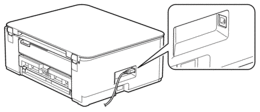
DCP-T530DW/DCP-T535DW/DCP-T536DW/DCP-T580DW/DCP-T583DW/DCP-T730DW/DCP-T735DW/DCP-T780DW
The USB port is located outside the machine as shown.
DCP-T830DW/DCP-T835DW/MFC-T930DW/MFC-T935DW/MFC-T980DW
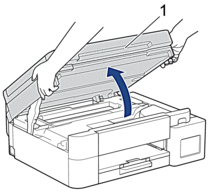
The USB and Ethernet ports are located inside the machine (Ethernet ports are available only for certain models).
- Place both hands under the plastic tabs on both sides of the machine to lift the scanner cover (1) into the open position.
- Locate the correct port (based on the cable you are using) inside the machine as shown.
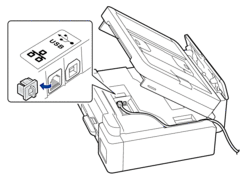
 Carefully guide the cable through the cable channel and out the back of the machine.
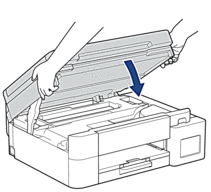
 - Gently close the scanner cover using both hands.
Did you find the information you needed?