



Copy Options
DCP-L3520CDW
| Menu selections | Options | |
|---|---|---|
| Quality | Select the copy quality for your type of document. | |
| Enlarge/Reduce | 100% | - |
| Enlarge | Select an enlargement ratio for the next copy. | |
| Reduce | Select a reduction ratio for the next copy. | |
| Custom(25-400%) | Enter an enlargement or reduction ratio. | |
| Density | Increase the density to make the text darker. Decrease the density to make the text lighter. | |
| Remove Bkg Clr | Select to remove the background colour of the document when copying. | |
| 2-sided (available only for certain models) | Select to copy on both sides of the paper.
1-sided → 2-sided 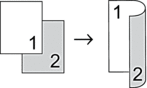
2-sided → 2-sided 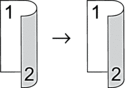 | |
| Contrast | Increase the contrast to make an image clearer. Decrease the contrast to make an image more subdued. | |
| Stack/Sort | Select to stack or sort multiple copies.
Stack 
Sort  | |
| Page Layout | Make N in 1 copies.
4 in1 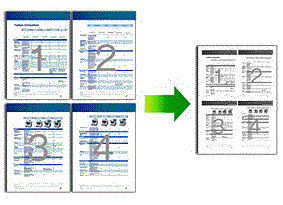 | |
| Auto Deskew | Set the machine to automatically correct skewed copies. | |
| Colour Adjust | Change the default setting for colour saturation. | |
DCP-L3560CDW/MFC-L3720CDW/MFC-L3755CDW/MFC-L3760CDW/MFC-L3780CDW/MFC-L8340CDW/MFC-L8390CDW
 [Options].
 | Menu selections | Options |
|---|---|
| Quality | Select the copy quality for your type of document. |
| Tray Use (MFC-L3780CDW/MFC-L8340CDW/MFC-L8390CDW) | Select a paper tray for the next copy. |
| Enlarge/Reduce | 100% | - |
| Enlarge | Select an enlargement ratio for the next copy. |
| Reduce | Select a reduction ratio for the next copy. |
| Custom(25-400%) | Enter an enlargement or reduction ratio. |
| Density | Increase the density to make the text darker. Decrease the density to make the text lighter. |
| Remove Background Colour | Select to remove the background colour of the document when copying. |
| 2-sided Copy | Select to copy on both sides of the paper.
1-sided → 2-sided
2-sided → 2-sided The available options will vary depending on your model. |
| 2-sided Copy Page Layout (available for certain settings) | Select long edge binding or short edge binding. |
| Contrast | Increase the contrast to make an image clearer. Decrease the contrast to make an image more subdued. |
| Stack/Sort | Select to stack or sort multiple copies.
Stack
Sort |
| Page Layout | Make N in 1 copies.
4 in1 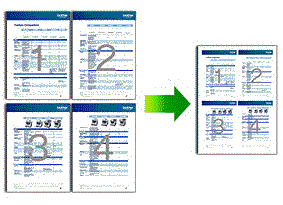 |
| Auto Deskew | Set the machine to automatically correct skewed copies. |
| Colour Adjust | Change the default setting for colour saturation. |