

Home > Routine Maintenance > Replace Supplies > Install or Remove the Output Tray


Install or Remove the Output Tray
The Output Tray is an optional accessory.
Install the Output Tray
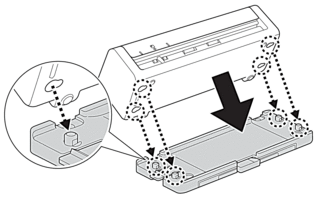
- Align the holes on the bottom of the machine with the docking pins on the Output Tray and push them together as shown.
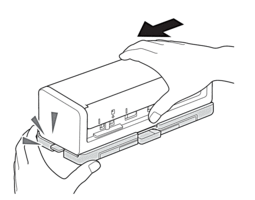
- Slide the machine to the left to secure it.
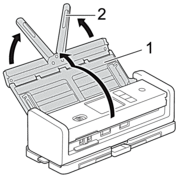
- Open the Top Cover (1), and then lift the Document Support Arms (2).
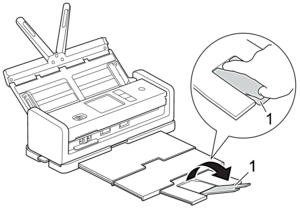
- Extend the Output Tray (1) to match the length of the document pages.
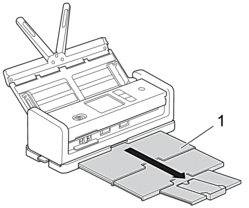
- Unfold the Document Stopper (1).
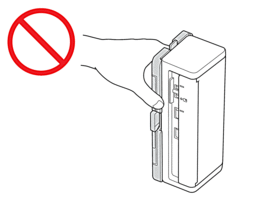
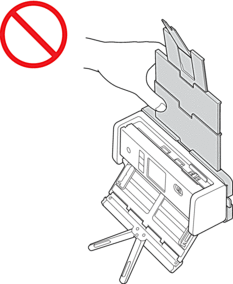
- CAUTION
- DO NOT carry the machine by the Output Tray.
Remove the Output Tray
- Close the Document Stopper (1) and collapse the Output Tray (2).
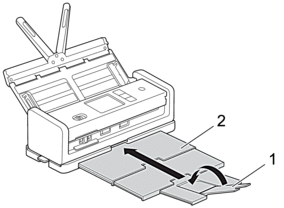
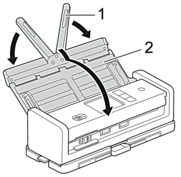
- Gently fold the Document Support Arms (1), and then close the Top Cover (2).
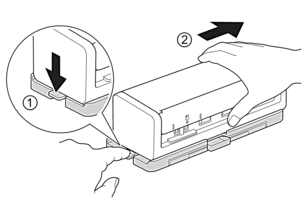
- While pressing the switch on the left side down, slide the machine to the right.
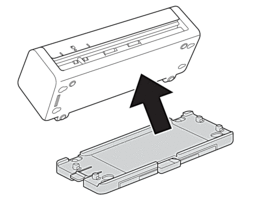
- Lift up the main unit to remove it.
Did you find the information you needed?