Your machine is equipped with a scan counter. The counter automatically counts how many times the machine has scanned. When the machine scans 50,000 times, the machine will display a message on the Status Monitor to remind you to replace the Pick-up Roller.
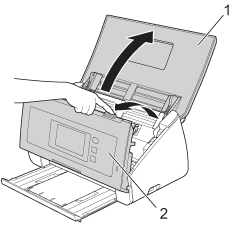
| 1 | Open the Top Cover (1) and the Front Cover (2). |
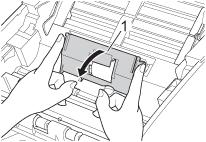
| 2 | Hold the both sides of the Pick-up Roller Cover (1) and then pull the cover down. |
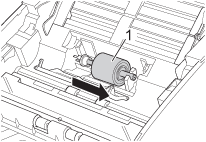
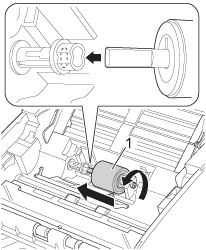
| 3 | Slide the Pick-up Roller (1) all the way to the right. |
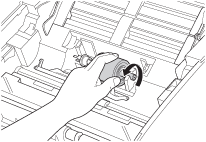
| 4 | The holder of the Pick-up Roller has a narrow opening, and the shape of the shaft of the Pick-up Roller matches this opening. Rotate the Pick-up Roller until you can fit the shaft into the opening of the holder. |
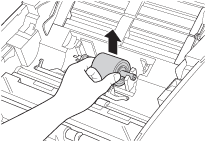
| 5 | Pinch and pull the Pick-up Roller out of the machine. |
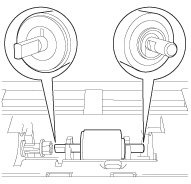
| 6 | Place a new Pick-up Roller into the machine.  Note | | Identify the left and right sides of the Pick-up Roller before attaching it. |
|
| 7 | Slide the Pick-up Roller (1) to the left edge while turning the Pick-up Roller. |
| 8 | Close the Pick-up Roller Cover. |
| 9 | Close the Front Cover and the Top Cover. |
| 10 | |
Note
| | Confirm the following items: | • | | | • | The error message on the Status Monitor has been cleared. | | • | The LCD does not show Replace Roller and Replace Pad. |
|