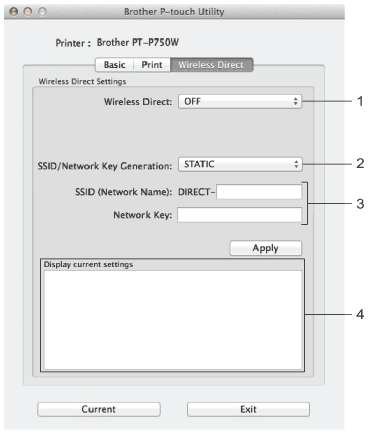
Wireless Direct Tab
1.
Wireless Direct
Turns the Wireless Direct function on or off.
Available settings: [
ON
], [
OFF
]
2.
SSID/Network Key Generation
Select [
AUTO
] or [
STATIC
].
3.
SSID (Network Name)/Network Key
Enter the SSID (3 to 25 ASCII characters) and the network key to be used in the Wireless Direct mode.
You can only specify a setting when [
STATIC
] is selected as [
SSID/Network Key Generation
].
4.
Display Current settings
Displays the current settings for Wireless Direct. Click the [
Current
] button to update the displayed settings with the most recent information.
Page Top