

Home > Appendix > Optional Accessories > Single Active Docking Station (Optional: PA-CR-002A) > Single Active Docking Station Overview (Optional: PA-CR-002A)


Single Active Docking Station Overview (Optional: PA-CR-002A)
Parts Description
| Single Active Docking Station 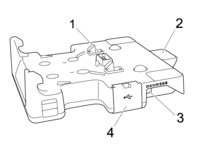 | Docking Station Terminal Attachment 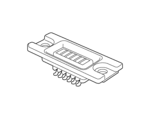 | Screws (2)  |
- Docking Station Terminals
- Eject Button
- DC Connector
- USB Port
(Allows to print from a mobile device or a computer by connecting it to the Docking Station using a USB cable.)
Specifications
| Charging time | About 4 hours *1
|
| Charging temperature | From 41°F to 95°F (From 5°C to 35°C) |
| Operating temperature | AC adapter: From 14°F to 104°F (From -10°C to 40°C) Car adapter: From 14°F to 122°F (From -10°C to 50°C) |
| Operating humidity | From 10% to 90% (without condensation) |
*1
Varies depending on the operating environment and the condition of the rechargeable Li-ion battery.
- NOTE
-
- The Docking Station can be used without a rechargeable Li-ion battery as a power supply or for printing.
- Do not turn on the printer and the Docking Station simultaneously.
- Sequential printing and the mass storage mode are not supported when the Docking Station is used to print.
- When the printer is placed on the Docking Station, we recommend using the After one page of data is received setting in the Other tab of the printer driver properties before printing.
Did you find the information you needed?