

Home > Set Up Your Printer > Attach the Belt Clip


Attach the Belt Clip
- Attach the Belt Clip to the Belt Clip Hook on the printer, as shown:
RJ-3235B/RJ-3255WB
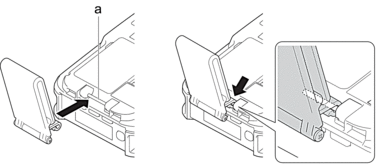
- Belt Clip Hook
RJ-4235B/RJ-4255WB
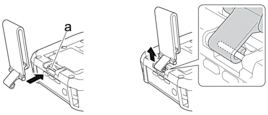
- Belt Clip Hook
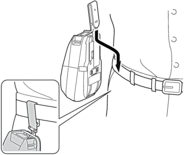
- Attach the Belt Clip to your belt, as illustrated.
RJ-3235B/RJ-3255WB
RJ-4235B/RJ-4255WB
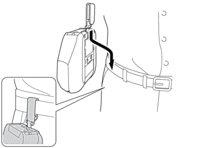

- Make sure you attach the Belt Clip securely to the printer.
- To detach the Belt Clip, reverse the installation procedure.
- We recommend using a belt that is less than 0.2" (5 mm) thick and less than 1 7/8" (47.63 mm) wide.
Did you find the information you needed?