

Home > Appendix > Optional Accessories > Charging Cradle (Optional: PA-CR-005) > Connect the Printer to a Wired LAN Network via Charging Cradle (Optional: PA-CR-005)


Connect the Printer to a Wired LAN Network via Charging Cradle (Optional: PA-CR-005)
Use an Ethernet (LAN) connection to configure your printer and upgrade its firmware.

LED Indicators
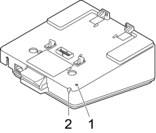
- Ethernet (LAN) LEDLED IndicatorStatus

Ethernet (LAN) not connected

- Ethernet (LAN) connected
- Receiving or sending data via Ethernet (LAN)
 The Ethernet (LAN) LED does not light up unless the printer is placed on the Charging Cradle.
 - Status LEDLED IndicatorStatus The printer is placed on the Charging Cradle and the rechargeable Li-ion battery is fully charged.
 The printer is charging via Charging Cradle
Interface compatibility
Use the [WLAN] and [Wired LAN] menus to select WLAN, Wired LAN, or no connection when the printer is on the Charging Cradle.
Cradle LAN Setting | WLAN Setting | Connection type when using the Charging Cradle |
|---|---|---|
On | On | |
On | Off | Wired LAN |
Off | On | WLAN |
Off | Off | No connection enabled |
*1
Wireless Direct function is not affected.
Did you find the information you needed?