

Home > Set Up Your Printer > Parts Description


Parts Description
TD-4215D/TD-4415D/TD-4425DN/TD-4525DN/TD-4425DNF
Front
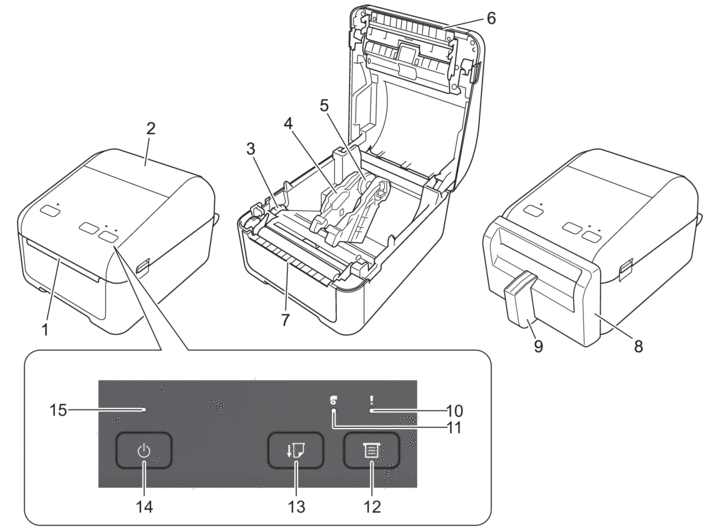
- Label Exit Slot
- Roll Compartment Cover
- Adjuster Dial
- Roll Guide
- Media Roll Holder
- Upper Tear Bar
- Lower Tear Bar (TD-4415D/TD-4425DN/TD-4525DN)
- Linerless Cutter Unit (TD-4425DNF)
- Label Support (TD-4425DNF)
- Status LED
- Roll LED
 (Function) Button
  (Feed) Button
  (Power) Button
 - Power LED

To pause printing, press any button except (Power). Press the button again to resume printing. Printing can be paused only after each full page has been printed and cannot be paused on the final page or between pages.
(Power). Press the button again to resume printing. Printing can be paused only after each full page has been printed and cannot be paused on the final page or between pages. Rear
TD-4215D/TD-4415D
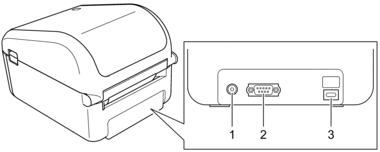
- Power Port
- Serial Port
- USB Port (Type-C)
TD-4425DN/TD-4525DN/TD-4425DNF
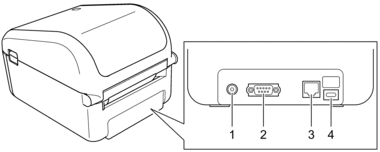
- Power Port
- Serial Port
- LAN Port
- USB Port (Type-C)
TD-4455DNWB/TD-4555DNWB/TD-4555DNWBF
Front
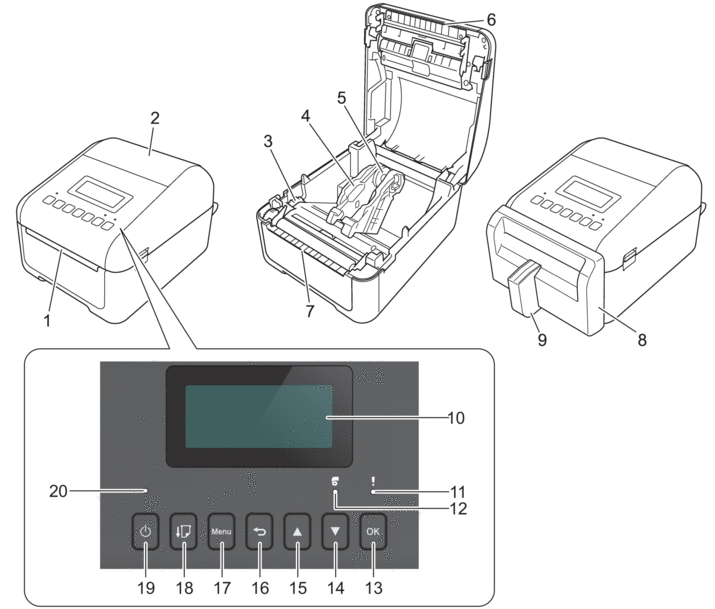
- Label Exit Slot
- Roll Compartment Cover
- Adjuster Dial
- Roll Guide
- Media Roll Holder
- Upper Tear Bar
- Lower Tear Bar (TD-4455DNWB/TD-4555DNWB)
- Linerless Cutter Unit (TD-4555DNWBF)
- Label Support (TD-4555DNWBF)
- LCD
- Status LED
- Roll LED
- OK Button
 (Down) Button
  (Up) Button
  (Back) Button
 - Menu Button
- (Feed) Button
- (Power) Button
- Power LED
To pause printing, press any button except (Power), (Up), or (Down). Press the button again to resume printing. Printing can be paused only after each full page has been printed and cannot be paused on the final page or between pages.
(Power), (Up), or (Down). Press the button again to resume printing. Printing can be paused only after each full page has been printed and cannot be paused on the final page or between pages. Rear
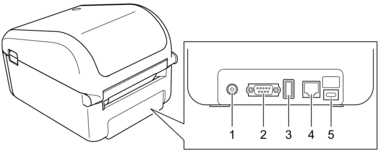
- Power Port
- Serial Port
- USB Host Port (Type-A)
- LAN Port
- USB Port (Type-C)
Did you find the information you needed?