HL-L5000D
 |
Manuals |
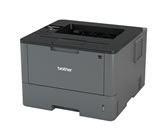
HL-L5000D
Language
User's Guide

Release Date: 08/12/2015
Version: 0
Size: 0.87MB
Brief explanations for routine operations

Release Date: 09/03/2017
Version: B
Size: -
For learning the operations, routine maintenance, troubleshooting tips and some useful network features of your products.
Release Date: 09/03/2017
Version: B
Size: 5.99MB
For learning the operations, routine maintenance, troubleshooting tips and some useful network features of your products.
Setup Guide
Release Date: 22/03/2019
Version: B
Size: 1.51MB
Safety instructions to read before attempting to operate the product, or before attempting any maintenance.
Release Date: 18/05/2020
Version: C
Size: 2.67MB
For the installation of the product.
Additional Feature Guide
Release Date: 02/09/2014
Version: B
Size: 0.33MB
For specific information about using the Brother Universal Printer Driver.
Release Date: 10/09/2021
Version: A
Size: 1.58MB
(requires a license key to activate, contact your dealer or Brother office if unsure of compatibility) This functionality provides enhanced device capability to print both 1D and 2D barcode fonts.
Release Date: 25/02/2026
Version: H
Size: 1.42MB
This software allows system administrators deploy and manage their networked/USB connected Brother printers and scanners and view the status of most other SNMP compliant printing devices.
Release Date: 01/05/2023
Version: A
Size: 0.57MB
This BRAdmin Professional 4 feature uses Microsoft Azure to let system administrators easily manage their networked/USB-connected Brother printers over the Internet.
Appendix
Release Date: 21/04/2020
Version: 08
Size: 0.17MB
For information about open source software used by the product.
Regulatory Documents
Release Date: 21/08/2024
Version: 14
Size: 1.02MB
Declaration of Conformity Document
Release Date: 21/08/2024
Version: 3
Size: 0.11MB
Declaration of Conformity Document for United Kingdom
Release Date: 02/12/2024
Version: 0
Size: 9.61KB
Information for compliance with Commission Regulation 801/2013

Download and view the document in PDF format. PDF documents require the installation of the Adobe® Acrobat® Reader® software. If you do not have the Adobe® Acrobat® software, click the "Adobe® Acrobat® Reader®" link to download the software.