
MFC-3200C
 |
FAQs & Troubleshooting |
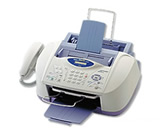
MFC-3200C
Search by Keyword(s)
Categorized
How To / Troubleshooting
Setup / Settings
Consumables & Accessories / Routine Maintenance
Others
Popular
Updated:10/23/2026
These are the most viewed FAQs, ranked by popularity.
- 1.The error message "No Supported Devices Found" appears on the Brother iPrint&Scan (mobile device).
- 2.The printer status is Offline or Paused.
- 3.When I try to print thin color borders in Microsoft® Excel, the borders are printed in black.
- 4.Can I print from or scan to Android™ Smartphone?
- 5.Can I print from and scan to iPhone, iPod touch and iPad?
Latest
These are the latest FAQs, sorted by last update date.
10/01/2026
I'm using Voice Over Internet Protocol (VoIP) and am having problems receiving faxes.
10/01/2026
I'm using Mac OS® 8.6-9.2. How can I uninstall the drivers?
06/01/2026
How to identify your Operating System (OS).
04/16/2025
I cannot print from my computer via USB.
06/27/2023
I'm using Ubuntu 23.04 on their derivatives. I cannot print from Brother Inkjet Printer. (Linux)