
HL-L2335D
 |
FAQs & Troubleshooting |
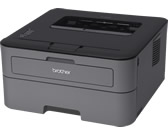
HL-L2335D
Search by Keyword(s)
Categorized
How To / Troubleshooting
Setup / Settings
Consumables & Accessories / Routine Maintenance
Others
Popular
Updated:02/10/2026
These are the most viewed FAQs, ranked by popularity.
- 1.(Video) Replace the Toner Cartridge
- 2.(Video) Load A4/Letter paper
- 3.(Video) Paper is Jammed in the 2-sided Tray
- 4.(video) I just replaced the toner cartridge and the LCD continues to display the message "Toner Low" / "Replace Toner" / "Toner Ended" or the Toner LED is still on or flashing.
- 5.(Video) Paper is Jammed in the Paper Tray
Latest
These are the latest FAQs, sorted by last update date.
01/10/2026
What kind of envelopes and labels are recommended for printing?
01/10/2026
I still receive the error message "Replace Drum" or "Drum End Soon" after I replace the drum unit with a new one.
17/09/2026
I get notifications about Intel-based apps on my Mac with Apple silicon.
01/06/2026
How to identify your Operating System (OS).
02/04/2026
Uninstall the Brother Software and Drivers (Windows)
