
HL-B2100D(B)
 |
FAQs & Troubleshooting |
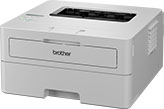
HL-B2100D(B)
Search by Keyword(s)
Categorized
How To / Troubleshooting
Setup / Settings
Consumables & Accessories / Routine Maintenance
Others
Popular
Updated:11/09/2026
These are the most viewed FAQs, ranked by popularity.
- 1.I just replaced the toner cartridge and the LCD continues to display the message "Toner Low" or "Replace Toner".
- 2.(Video) Set up your Brother machine
- 3.(Video) Paper is Jammed inside the Machine
- 4.(Video) After the selected tray is out of paper, the Brother Machine prints by different paper size and paper types from another tray.
- 5.(Video) I cannot find some option in the Printing preferences. (For Windows)
Latest
These are the latest FAQs, sorted by last update date.
01/06/2026
How to identify your Operating System (OS).
08/05/2026
Uninstall the Brother Software and Drivers (Windows)
18/03/2026
I cannot print a test page after installing the printer driver. (Windows)
10/03/2026
What is the default password for my BRAdmin or Web Based Management?
09/03/2026
I cannot install the printer driver or print in Windows 11.
