


| | |
| 1 | Turn the power of the printer ON. | ||||
| 2 | From the Go menu, select Applications. | ||||
| 3 | Open the Utilities folder. | ||||
| 4 | Double click the Printer Setup Utility icon. (Mac OS® X 10.2.x users, click the Print Center icon.) | ||||
| 5 | Click Add. | ||||
| 6 | Select IP Printer. (Mac OS® X 10.2.4 to 10.3.x)  (Mac OS® X 10.4) 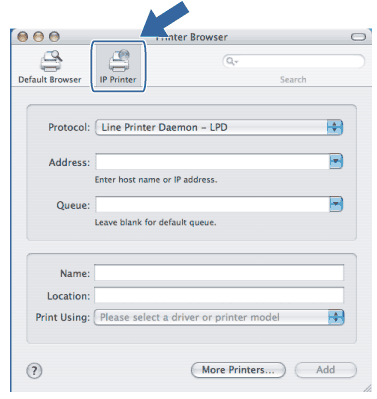 | ||||
| 7 | Enter the IP address of the printer into the Address box. (Mac OS® X 10.2.4 to 10.3.x) 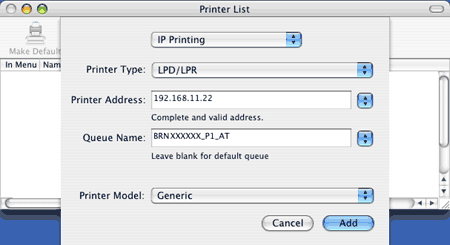 (Mac OS® X 10.4) 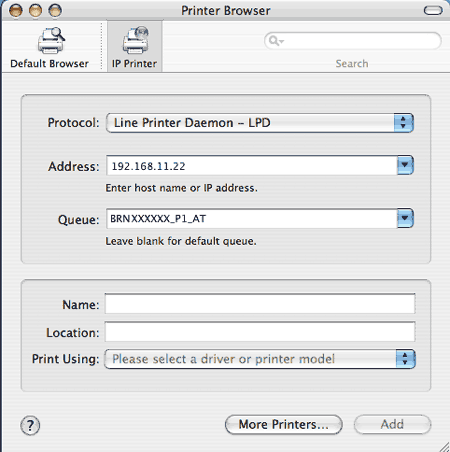  Note Note
| ||||
| 8 | From the Print Using pull-down list select your model. For example, select Brother HL-4050CDN BR-Script3. (Mac OS® X 10.2.4 to 10.3.x) 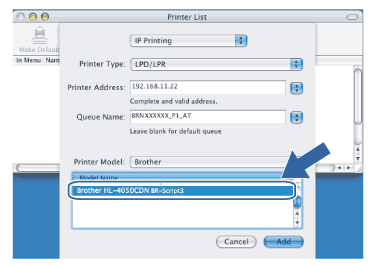 (Mac OS® X 10.4) 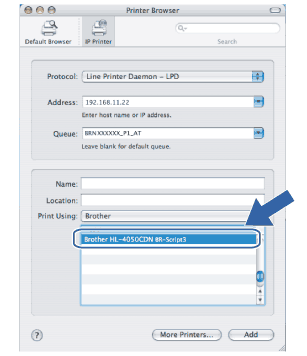 | ||||
| 9 | Click Add and the printer will be available from the Printer List. |
| | |