| | |
| 1 | Zapnite počítač Macintosh. | ||||
| 2 | V ponuke Go (Prejsť) vyberte možnosť Applications (Aplikácie). | ||||
| 3 | Otvorte priečinok Utilities (Pomocné programy). | ||||
| 4 | Dvakrát kliknite na ikonu Printer Setup Utility (Nástroj na nastavenie tlačiarne). | ||||
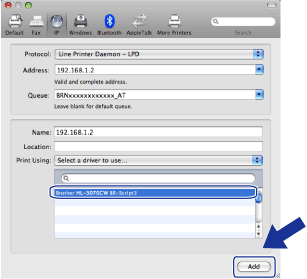
| 5 | Kliknite na tlačidlo Add (Pridať). | ||||
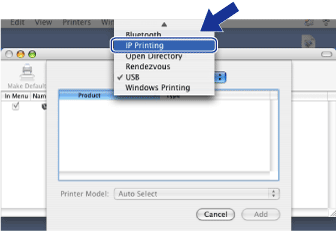
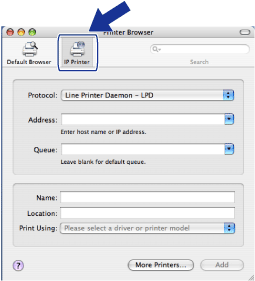
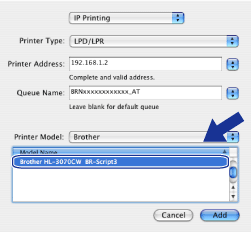
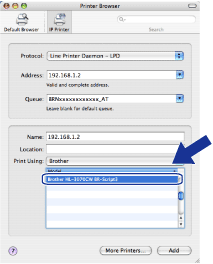
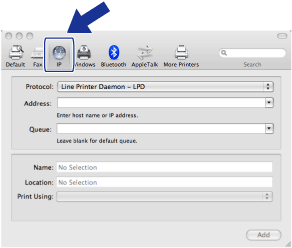
| 6 | (Systém Mac OS X 10.3.9) Vyberte možnosť IP Printing (Tlač IP). (Systém Mac OS X 10.4.x) Vyberte možnosť IP Printer (Tlačiareň IP). | ||||
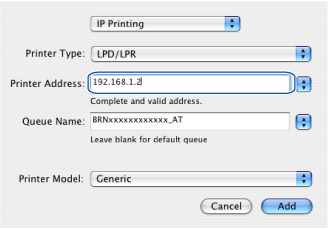
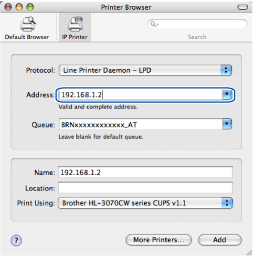
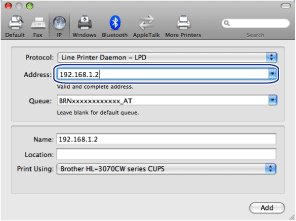
| 7 | (Systém Mac OS X 10.3.9) Zadajte IP adresu tlačiarne do poľa Printer Address (Adresa tlačiarne). (Systém Mac OS X 10.4.x) Zadajte IP adresu tlačiarne do poľa Address (Adresa).  Poznámka Poznámka
| ||||
| 8 | Z rozbaľovacej ponuky možnosti Printer Model (Print Using) (Model tlačiarne (Použitá tlač)) vyberte svoj model. Napríklad vyberte Brother HL-3070CW BR-Script3. | ||||
| 9 | Po kliknutí na tlačidlo Add (Pridať) bude tlačiareň dostupná v priečinku Printer List (Zoznam tlačiarní). Tlačiareň je teraz pripravená na tlač. |
| | |