Layout
•
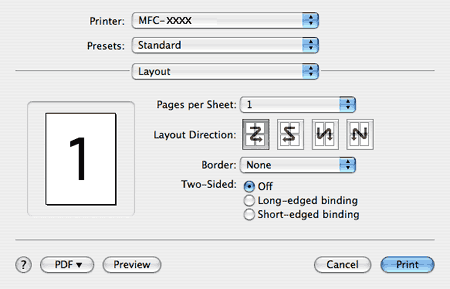
Pages per Sheet
Choose how many pages will appear on each side of the paper.
•
Layout Direction
When you specify the pages per sheet, you can also specify the direction of the layout.
•
Border
If you want to add a border, use this function.
Duplex Printing
•
Use duplex unit
(Not available for MFC-9440CN and DCP-9040CN)
•
For Mac OS
®
X 10.3 or greater
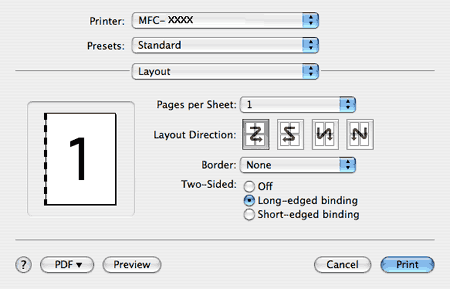
Select
Layout
.
Choose
Long-edged binding
or
Short-edged binding
in
Two-Sided
.
•
For Mac OS
®
X 10.2
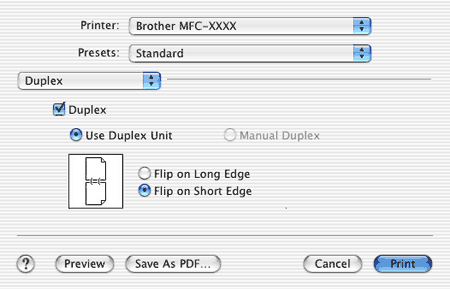
Select
Duplex
.
Check the
Duplex
check box. Choose
Use Duplex Unit
and then choose
Flip on Long Edge
or
Flip on Short Edge
.
•
Manual duplex
(For Mac OS
®
X 10.3 or greater)
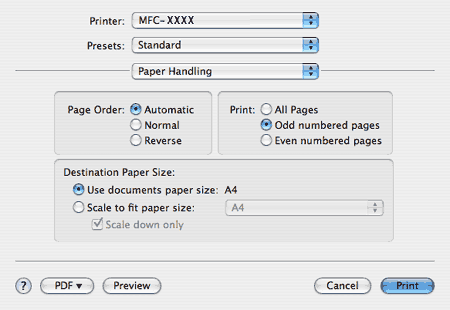
Select
Paper Handling
.
Choose
Odd numbered pages
and print, and then choose
Even numbered pages
and print.
Page Top