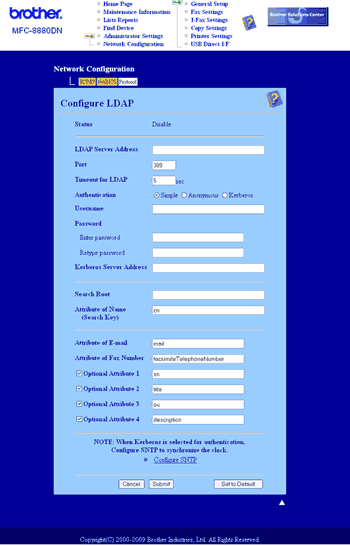
You can configure and change the LDAP settings using a web browser. Click Network Configuration on the MFC-8880DN web page, and then click Configure Protocol. Make sure that the check box for LDAP is on and then click Advanced Settings.
| • | Status Enable/Disable |
| • | LDAP Server Address |
| • | Port (The default port number is 389.) |
| • | Timeout for LDAP |
| • | Authentication |
| • | Username |
| • | Password |
| • | Kerberos Server Address |
| • | Search Root |
| • | Attribute of Name (Search Key) |
| • | Attribute of E-mail |
| • | Attribute of Fax Number |
After setting, make sure that the Status is OK on the Test Result page.

Note
| • | If the LDAP server supports Kerberos Authentication, we recommend to choose Kerberos on Authentication setting. It provides strong authentication between LDAP server and your machine. |
| • | For the details of each item, see the Help Text in the Web Based Management. |