Handling and using print media

•
Store paper in its original packaging, and keep it sealed. Keep the paper flat and away from moisture, direct sunlight and heat.
•
Avoid touching the shiny (coated) side of photo paper. Load photo paper with the shiny side facing down.
•
Avoid touching either side of transparencies because they absorb water and perspiration easily, and this may cause decreased output quality. Transparencies designed for laser printers/copiers may stain your next document. Use only transparencies recommended for inkjet printing.
•
You can only print on both sides of the paper with PC printing. (See Printing for Windows® in the Software User’s Guide on the CD-ROM.)
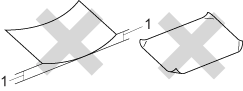
Improper Setup Improper Setup
DO NOT use the following kinds of paper:
•
Damaged, curled, wrinkled, or irregularly shaped paper
Graphic
1.
2 mm or greater
•
Extremely shiny or highly textured paper
•
Paper that cannot be arranged uniformly when stacked

Paper capacity of the paper tray

Up to 50 sheets of 80 g/m2 A4 paper.
•
Transparencies and photo paper must be picked up from the output paper tray one page at a time to avoid smudging.