If you have print quality problems, clean the drum unit as follows.
| 1 | Turn off the machine. And then unplug the power cord from the electrical socket. |
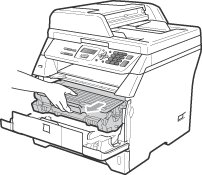
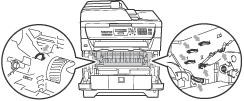
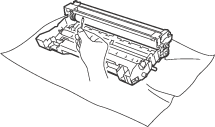
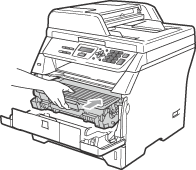
| 2 | Open the front cover and slowly take out the drum unit and toner cartridge assembly.   IMPORTANT | • | We recommend that you put the drum unit and toner cartridge assembly on a clean, flat surface with a sheet of disposable paper or cloth underneath it in case you accidentally spill or scatter toner. | | • | To prevent damage to the machine caused by static electricity, DO NOT touch the electrodes shown in the illustration. |
|
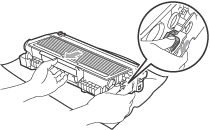
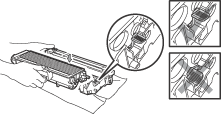
| 3 | Push down the blue lock lever and take the toner cartridge out of the drum unit. IMPORTANT | • | Handle the toner cartridge carefully. If toner scatters on your hands or clothes, wipe or wash it off with cold water at once. | | • | To avoid print quality problems, DO NOT touch the shaded parts shown in the illustrations below. |
|
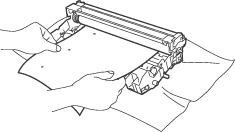
| 4 | Put the print sample in front of the drum unit, and find the exact position of the poor print. |
| 5 | Turn the drum unit gear by hand while looking at the surface of the OPC drum (1). |
| 6 | When you have found the mark on the drum that matches the print sample, wipe the surface of the OPC drum with a dry cotton swab until the dust or glue on the surface comes off. IMPORTANT | • | The drum is photosensitive so DO NOT touch it with your fingers. | | • | DO NOT clean the surface of the photosensitive drum with a sharp object. | | • | DO NOT use excessive force when cleaning the drum unit. |
|
| 7 | Put the toner cartridge back into the drum unit until you hear it lock into place. If you put the cartridge in correctly, the blue lock lever will lift automatically. |
| 8 | Put the drum unit and toner cartridge assembly back in the machine. |
| 9 | Close the front cover. |
| 10 | Plug the machine’s power cord back into the electrical socket first and then reconnect all cables. Turn on the machine. |