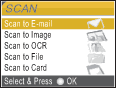
When you want to scan to card, press

(
Scan).
The LCD shows:
Press

or

to choose
Scan to Card.
Press OK.
If you are not connected to your computer only the Scan to Card selection will appear on the LCD.
(See Scanning for Windows® or Macintosh® in the Software User’s Guide for details about the other menu options.)