

Home > Routine Maintenance > Replace Supplies > Replace the Toner Cartridge


Replace the Toner Cartridge
Before starting the replacement procedure, see Related Information: Replace Supplies.
- Make sure the machine is turned on.
- Press the front cover release button and open the front cover.
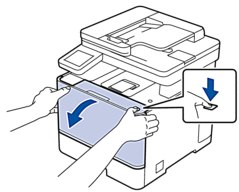
- Hold the drum unit's green labeled handle. Pull the drum unit out of the machine until it stops.
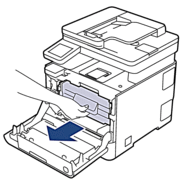
- IMPORTANT
- We recommend placing the toner cartridge and drum unit assembly on a clean, flat surface with disposable paper underneath it in case you accidentally spill or scatter toner.
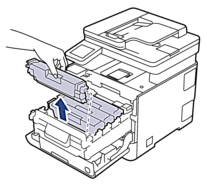
- Hold the handle of the toner cartridge and pull the toner cartridge up and out of the drum unit. Repeat this for all toner cartridges.
- Clean the corona wire inside the drum unit by gently sliding the green tab from left to right and right to left several times. Repeat this for all the corona wires.
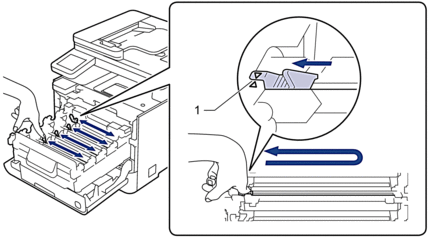
 To avoid poor print quality, be sure to lock the green tab into the home position (1), flush left with the left side of the drum.
 - Unpack the new toner cartridge.
- Remove the protective materials.

- Insert the toner cartridge into the drum unit. Make sure that you match the toner cartridge colour to the same colour label on the drum unit. Repeat this for all toner cartridges.
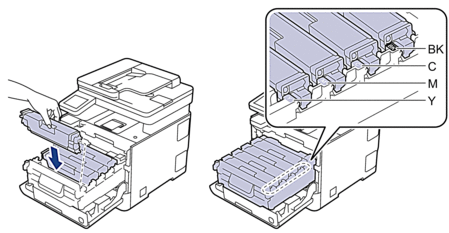
- BK: Black
- C: Cyan
- M: Magenta
- Y: Yellow
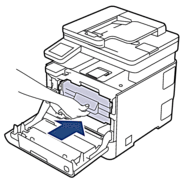
Make sure you put the toner cartridge in correctly or it may separate from the drum unit. - Using the green labeled handle, push the drum unit back into the machine until it locks in place.
- Close the machine's front cover.
After replacing a toner cartridge, DO NOT turn the machine off or open the front cover until the machine's display returns to Ready Mode.
- The toner cartridge that comes with your Brother machine is an Inbox toner cartridge.
- We recommend keeping a new toner cartridge ready for use when you see the Toner Low warning.
- DO NOT unpack the new toner cartridge until you are ready to install it.
- If a toner cartridge is left unpacked for a long time, the toner life will be shortened.
- We recommend using genuine Brother supplies to ensure stable print quality and performance. Although not all non-genuine supplies may cause quality issues, it is possible that some may adversely affect print quality or cause machine malfunction. Brother may charge for repairing your machine if it is proven that non-genuine supplies caused the damage, even if the machine is still covered by the warranty.
Did you find the information you needed?