

Home > Introduction to Your Machine > Input/Output Port Locations on Your Machine


Input/Output Port Locations on Your Machine
The ports are located on the front or back of the machine.
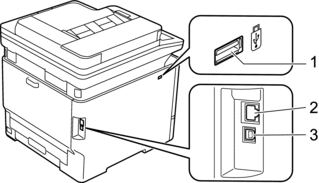
USB accessory port (Front)
- 10BASE-T / 100BASE-TX / 1000BASE-T port (For network models)
- USB port
When connecting the USB or network cable, follow the instructions in the software/driver installer.
To install the necessary driver and software for operating your machine, go to your model's Downloads page at support.brother.com/downloads.
Did you find the information you needed?