

Home > Scan > Scan Using the Scan Button on Your Machine > Scan Multi-page Letter or A4 Size Documents


Scan Multi-page Letter or A4 Size Documents
When scanning a multi-page Letter or A4 size document into a single file such as a PDF, the scan result depends on how to place the document.
- To get the scan result in landscape orientation, load the document into the ADF long edge first or place it on the scanner glass with the long edge aligned with the left side of the scanner glass.
- To get the scan result in portrait orientation, load the document into the ADF short edge first or place it on the scanner glass with the short edge aligned with the left side of the scanner glass.
| How to Place the Document | Scan Result |
|---|---|
| Long edge first | Landscape |
| ADF | Scanner glass |  |
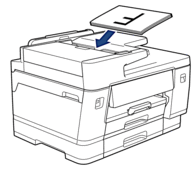 | 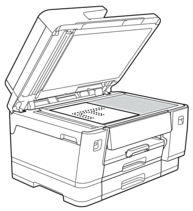 |
| Short edge first | Portrait |
| ADF | Scanner glass |  |
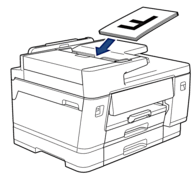 | 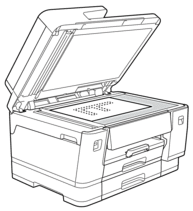 |
Did you find the information you needed?