

Home > Routine Maintenance > Check Your Brother Machine > Check the Ink Volume


Check the Ink Volume
Although an ink volume icon appears on the machine's LCD, you can view a larger graph that displays the approximate ink remaining in each cartridge.
- Press
 .
. The touchscreen displays the ink volume.
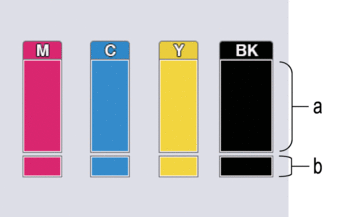
- Displays the cartridge ink level.
- Displays the ink level remaining in the internal ink reservoir.

- When the ink cartridge is near the end of its life or having a problem, one of the following icons appears:

The ink level is low.

The ink cartridge needs to be replaced.
- To check or print the ink cartridge model numbers, press
 (Back) to return to the [Ink] menu screen.
 Press [Ink Cartridge Model], and follow the instructions on the touchscreen.
- Press
 .
. - You can also check the ink volume from your computer.
Did you find the information you needed?